

How to Access Your Entire Photo Library When You’re Traveling
What if you could access every image in your photo library while traveling – and rely on a simple solution to protect the photos you capture on the road?
Mylio Photos makes both these goals possible. The app works differently than other photo software. It’s a digital photo hub that turns your computers, phones, tablets, and storage devices into an intelligent system for managing and backing up a lifetime of photos, videos, and important documents.
Here are the biggest benefits of the way the app works. It serves as a universal library for all major platforms (Windows, iOS, Android, macOS). With Mylio Photos, you can consolidate all your media – from unlimited sources – so it’s cataloged together in one beautiful library you can access from all your devices, anytime, anywhere. No cloud service is required.
Keep reading to learn how Mylio Photos allows you to manage your entire library while traveling (even without the internet) — and helps protect the new images you’re shooting. (Try Mylio Photos for free here.)

Fit your entire library on your phone or tablet with Mylio Photos
With Mylio Photos, you can fit even a massive photo library on a limited-capacity tablet or smartphone.
How does it work?
Mylio Photos syncs optimized versions of your photos to devices with limited storage space, such as a laptop or smartphone. It protects your originals on larger-capacity devices you control such as external drives, a desktop computer, NAS, or cloud service.
Mylio Photos’ optimized smart previews take up about 5% of the space compared to originals. To put this in perspective, one million smart preview files will take up about 1 TB of storage.
Before your trip
As you get ready to leave, you’ll want to set up Mylio Photos so it works seamlessly to help you access and protect all your photos while you’re on the road. Here are four steps to take before departure.
Sync the mobile devices you plan to take with optimized versions of all your photos. The Mylio Photos Sync Panel lets you check the sync status of all your connected devices at a glance. This helps you ensure that your entire media collection is backed up before you take off, and that you can browse and organize your entire library while you’re on the road.
Free up space on your phone’s camera roll. Mylio Photos can import and back up media from your iOS or Android phone automatically. It can even free up space on your phone’s camera roll once your photos are safely backed up. The app does this by scanning your library, then letting you know how many files can be safely deleted and how much storage the deletions will free up.
Taking these steps ensures you’ll be able to access all your photos during your trip. Plus, you’ll have more room for pictures you’ll be taking.
Leave a system at home (like your computer) powered on and running Mylio Photos in the background. If you have internet connectivity while traveling, this will let you access your full-quality media on demand. The app will automatically begin syncing any new photos you add to your storage and backup devices at home.
While you’re traveling
Travel days can be busy. But there’s also often some downtime in hotels and airports. Try these two travel-photo hacks to ease your post-processing workflow once you’re back in the daily routine at home.
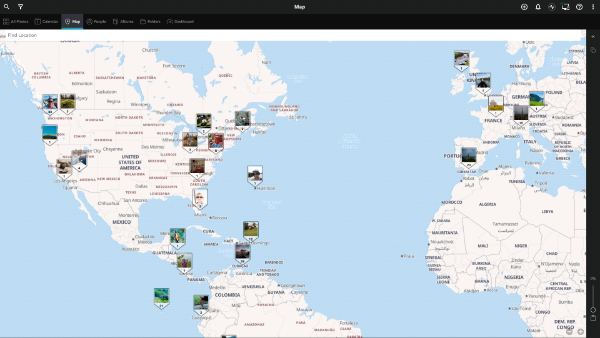
Take photos with your smartphone at key locations even if you’re shooting mostly with a mirrorless or DSLR camera. Why? These photos can provide additional metadata. For instance, if your camera doesn’t add geotags, you can easily grab the GPS coordinates from a smartphone photo then batch-apply those coordinates to other photos you shot at that location in Mylio Photos.
Start reviewing and organizing your photos with QuickReview mode. Mylio Photos offers some unique benefits that can help you maximize time in your hotel room, a coffee shop, and even WiFi-free flights. Getting ahead on your workflow while travel photos are fresh in your mind is never wrong.
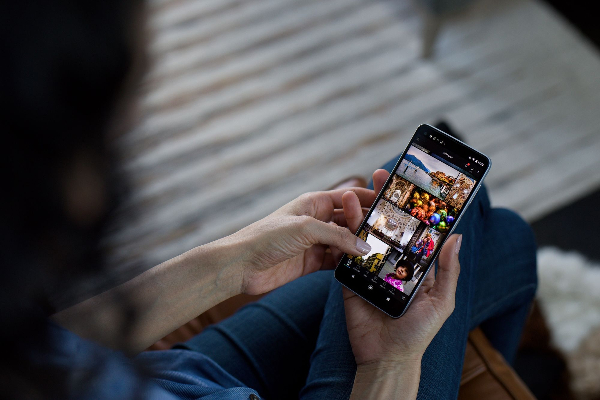
QuickReview mode lets you review hundreds of photos quickly on a smartphone in Mylio Photos. With a nod to one-handed gestures made popular by apps like Tinder, just swipe right to keep a photo, swipe left to reflect and flag it for deletion. The tool works on tablets and laptops too, with keyboard shortcuts.
You can also manage photos on the flight home. You don’t need an internet connection to organize and manage your photos in Mylio Photos; they’re all stored on your mobile device. The offline changes you make will sync across your devices when you’re back online.
Once you’re back home
Now it’s time to continue refining your travel photo collection and to share your best shots.
Add or correct metadata if necessary. Did you forget to change your camera settings to the correct time zone? Use Mylio Photos to shift the date or time. If you took a photo with your phone while shooting, you can copy and batch-apply the timestamp information to camera photos taken at the same time.
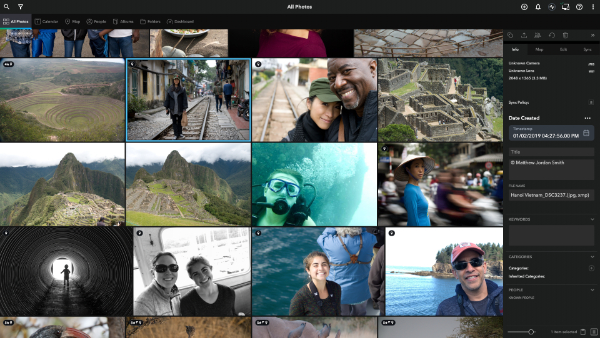
Edit photos in Mylio Photos, or your favorite external editor. The editing tools in Mylio Photos are quite good for basic edits. But if you like to use external editors like Lightroom, Photoshop, Luminar Neo, or Radiant Photo, it’s quick and easy to hand off a photo or group of photos. After making edits externally, you just save the edited versions back to your Mylio Photos library.
Play with PhotoExplorer. Tap any of your images in Mylio Photos to automatically launch a web search based on the GPS info in the photo. It’s a neat trick that lets you rediscover the name of that great restaurant you found, or search for more information related to a site you visited.
Share your best photos. It’s convenient to share photos and videos from Mylio Photos: Just Copy and Paste to most external apps, email, text, and other platforms. You can also use their SafeShare option to strip all personal info from images before sharing to other applications or posting to social media.
Ready to test drive Mylio Photos for free? Learn more and get started with this link.




