Freelance Photographer in Dubai, UAE - Experienced, Sophisticated, Affordable & Reliable
  • Home
  • Photography
    • Real Estate Photography
    • Landscape Photography
      • Travel Photography
      • Street Photography
    • Portrait Photography
      • Business Portrait Photography
      • Fashion Photography
    • Food Photography
    • Product Photography
    • Event Photography
      • Concert Photography
    • Sport Photography
    • Still Photography
  • Videography
    • 360 Interactive Virtual Tour
  • Latest Projects
  • News & Tips
  • Contact
Home
Photography
    Real Estate Photography
    Landscape Photography
    Travel Photography
    Street Photography
    Portrait Photography
    Business Portrait Photography
    Fashion Photography
    Food Photography
    Product Photography
    Event Photography
    Concert Photography
    Sport Photography
    Still Photography
Videography
    360 Interactive Virtual Tour
Latest Projects
News & Tips
Contact
Freelance Photographer in Dubai, UAE - Experienced, Sophisticated, Affordable & Reliable
  • Home
  • Photography
    • Real Estate Photography
    • Landscape Photography
      • Travel Photography
      • Street Photography
    • Portrait Photography
      • Business Portrait Photography
      • Fashion Photography
    • Food Photography
    • Product Photography
    • Event Photography
      • Concert Photography
    • Sport Photography
    • Still Photography
  • Videography
    • 360 Interactive Virtual Tour
  • Latest Projects
  • News & Tips
  • Contact
News and Tips

There’s More to Photoshop’s Crop Tool Than You Realize (VIDEO)

November 10, 2023 by Louie Alma Photography No Comments

There’s More to Photoshop’s Crop Tool Than You Realize (VIDEO)

Cropping images to refine composition is a no brainer, right? Well not exactly, because Photoshop’s easy-to-used Crop tool provides more creative capabilities than you likely realize. You probably use this tool almost every time you process an image, so it’s important to understand everything it can do.

The tutorial below will quickly bring you up to speed by explaining several ways to crop images like a pro. There’s nothing complicated about this simple primer that reveals a few tricks for photographers of all skill levels. By the time you’re done watching, the task of cropping will be easier and more productive than ever before.

Instructor Robin Whalley is an accomplished British landscape photographer and the author of over 20 popular books on photography and post processing with Lightroom and Photoshop. His goal for today’s seven-minute episode is “to explore the many lesser-known features and shortcuts you can use with Photoshop’s Crop tool.”
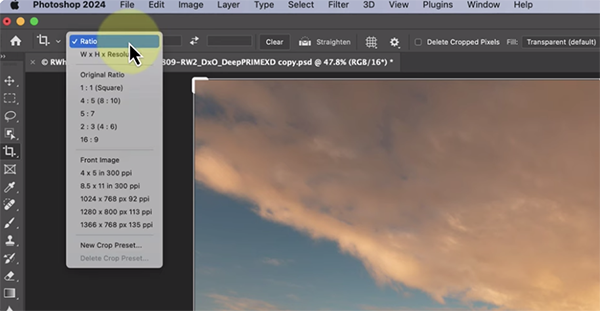
After selecting the crop tool on the left side of the interface various options will appear in the content-sensitive toolbar at the top of the screen. The first important choice to make is to decide whether you want to crop an image to a specific aspect ratio or to a particular size. As you’ll see, making this determination is as easy as selecting your preference from a dropdown menu.

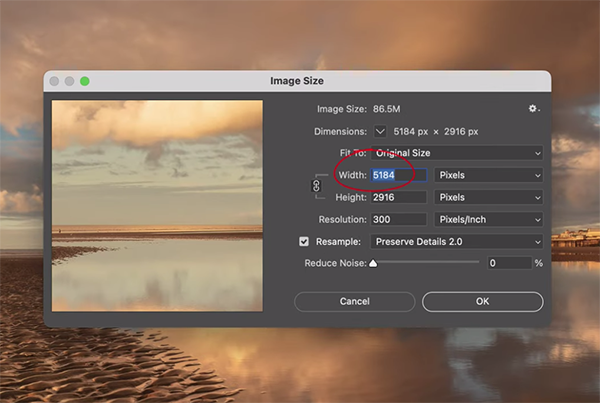
Once you do that a grid overlay appears on the image to confirm the cropped area in use. You can employ this crop by checking a tick mark at the top of the panel. Then you can quick confirm image size by clicking on the Image tab that includes another dropdown menu with  more helpful options, one of which is clearly labeled Image Size. Photoshop lets you specify whether you view width and height information in pixels or inches.

You can also choose the resolution you desire after the crop is applied. It easy to modify any of the aforementioned options by selecting the Undo option that resides under the Edit tab and then revising the preliminary choices you made.
At this point Whalley has just covered the basics with which you’re likely familiar, but as the video proceeds he demonstrates all the additional tricks you can employ to crop photos with maximum precision. So pay close attention and then give Photoshop’s Crop tool the full respect it deserves.

Whalley’s instructional YouTube channel is full of helpful lessons on shooting and editing techniques, so be sure to pay a visit and see what he has to offer.

And be sure to watch the powerful tutorial we posted recently from another image-editing expert who explains how to employ masks during the editing process for photos with perfect color and exposure.
Share:
Reading time: 2 min
News and Tips

Nighttime is the Right Time for Outdoor Photos if You Use These Easy Tips (VIDEO)

November 10, 2023 by Louie Alma Photography No Comments

Nighttime is the Right Time for Outdoor Photos if You Use These Easy Tips (VIDEO)

Something magical tends to happen once the sun drops below the horizon: scenes that were dull and unimpressive during the day are often transformed into sparkling tableaus full of interesting light, vivid colors, and captivating reflections—while all the boring stuff disappears into the shadows.

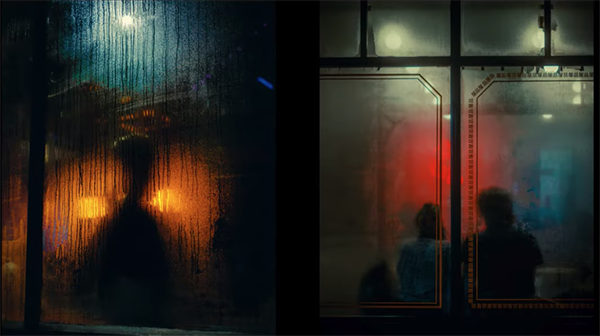
In this nine-minute tutorial you’ll learn three simple techniques used by London-based pro Eren Sarigul to capture eye-popping images with whatever camera gear you own. Sarigul specializes in shooting nighttime street scenes and cityscapes, but the most of his advice is equally valuable for other genres of outdoor photography.

Sarigul says that, “For me, cities come to life at night and I find myself drawn to capture street scenes as the sun goes down.” He explains why shooting at night can be more difficult for the uninitiated than it is when capturing photos during the day. That’s primarily due to the fact that there’s less light to work, making it challenging to make good images unless you know a few tricks.

Finding interesting light after dark can be more difficult that it sounds, and Sarigul has several great ideas for choosing subjects that will translate into enchanting imagery. Lights coming from skyscrapers and storefronts are part of the equation, as are streetlamps, colorful light trails from cars, and reflections on wet roads.

Another compelling reason to experiment with night photography is that it enables you to capture the viewer’s imagination and tell a story with the images you shoot. Sarigul notes that daytime light tends to be somewhat consistent and predictable, but that’s hardly the case when shooting the aforementioned subjects with unique colors and tones that may affect much of what’s within the frame.

Sarigul describes these attributes as opportunities, rather than drawbacks, as he demonstrates how to use a variety of light sources in unique and interesting ways. It takes a thoughtful approach, a different style of composition, and a sound understanding of how to arrive at a correct exposure—all of which you’ll learn in barely nine minutes.

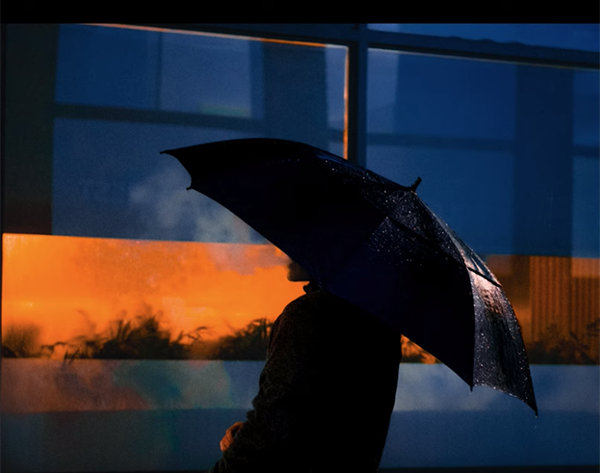
One effective technique is to find a subject in front of  bright light, and then expose for the illumination to throw the subject into silhouette. This approach, according to Sarigul, “immediately adds a sense of isolation, loneliness, and a clear storyline into an otherwise boring image.

Sarigul provides more great advice for using the cover of darkness to create images full of mood and emotion, so take a look at his inspiring images, grab your gear, head out into the shadows, and give these tips a try.

You can find more interesting lessons like this one by paying a visit to Sarigul’s YouTube channel. And be sure to watch the related tutorial we posted recently from another skilled pro, explaining how to shoot impressive outdoor photographs when the light is less than ideal.

Share:
Reading time: 2 min
News and Tips

A BETTER Way to Use the Content Aware REMOVE Tool for Cleaner Outdoor Photos (VIDEO)

November 10, 2023 by Louie Alma Photography No Comments

A BETTER Way to Use the Content Aware REMOVE Tool for Cleaner Outdoor Photos (VIDEO)

Object removal is one of the staples of editing images for simplicity and maximum impact. Maybe you want to eliminate the proverbial fence post emanating from a subject’s head, or get rid of other equally distracting elements that detract from a shot.

There are a number of ways to get the job done, and one of the best is using Lightroom’s powerful Content Aware Remove tool. But what if we said that you’re doing it wrong and there’s a better way to achieve effective results?

Today’s instructor is photographer Brian Matiash whose instructional YouTube channel has a simple motto: “Make Pictures Better” with simple editing tools that anyone can master. In today’s episode he explains why you may not be harnessing the fully power of Lightroom’s Content Aware Remove tool, and then he demonstrates three straightforward tips for doing it right.

Matiash begins with an overview of the various methods at your disposal, which include the versatile Healing panel tools. Then he reveals his favorite tricks for accomplishing a variety of tasks, the first of which is the simple process of removing dusts spots that can spoil an image. In fact, as a landscape photographer, Matiash says this is often the first enhancement he makes.

Some dust spots are easy to see, while others can be difficult to detect (depending on the f/stop you used) until you make a large print—at which point you’ll have to head back to the computer unless you used Matiash’s approach from the get-go. This trick is as simple as enabling Lightroom’s Visualize Spots option before you begin an edit.

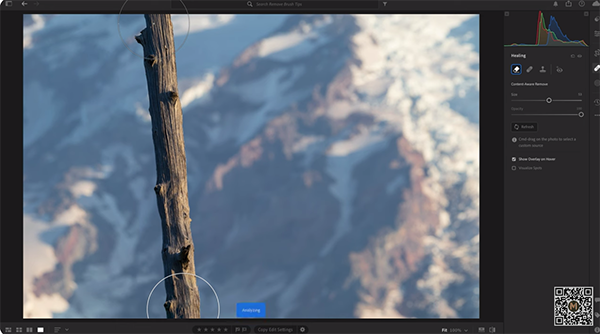
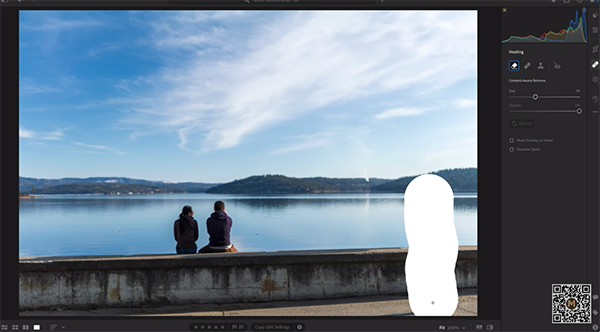
Many objects requiring removal are much larger than small, ugly spots, and eliminating these is the next topic of this lesson. Matiash demonstrates how he quickly gets rid of a small barren tree that adds nothing to his illustrative photo. As you’ll see, the first step here is selecting the proper type of brush of the correct size. This greatly simplifies getting the process.

There are several other ways to use Lightroom’s Remove tool, and Matiash demonstrates how they work. You’ll see how to make a straight selection, sample different parts of an image, and quickly execute other tasks that will greatly improve a photo.

Matiash also demonstrates how to deal with the occasional situation in which “Lightroom messes up.” He offers a wide variety of other helpful lessons on his popular YouTube channel, so be sure to take a look.

We also suggest checking out our earlier post with a complete guide to using Lightroom’s powerful Tone Curve for beginners and advanced photographers alike.

Share:
Reading time: 2 min
Page 3 of 3«123

Advertisement

Sandals Dunn’s River Set the Stage as NBC’s ‘TODAY with Jenna & Sheinelle’ Broadcast

March 29, 2026

Croissants have been the breakout home decor trend this spring – Aldi’s new croissant-scented candle is the latest must-have to add to your collection

Wildlife experts say you can feed garden birds leftover cooked pasta – here are the surprising benefits

Simba has just launched an Amazon-exclusive mattress that only costs £349 – it’s nearly half the price of its normal 5-star rated range

Primark’s new homeware range is giving ‘citrus summer’, and shoppers are obsessed – these are 6 sunny picks Instagram can’t get enough of

An Easy HDR Workflow: The Ponta de São Lourenço Case Study

THE RITZ-CARLTON ORLANDO, GRANDE LAKES DEBUTS SIGNATURE EXPERIENCES

March 28, 2026

Hotel Sacher Vienna celebrates its 150th anniversary – with sculptures by Erwin Wurm

Majority of U.S. travelers now use AI for trips, marking fastest behavioral shift in a decade

Discover the perfect place to celebrate Easter and stay at Rome Cavalieri

Subscribe to Our Newsletter

Check your inbox or spam folder now to confirm your subscription.

Popular Posts

LUXURY APARTMENT IN DUBAI

LUXURY APARTMENT IN DUBAI

August 20, 2020
LUXURIOUS AND SPACIOUS VILLA IN DUBAI

LUXURIOUS AND SPACIOUS VILLA IN DUBAI

LUXURY VILLA IN PALM, DUBAI

LUXURY VILLA IN PALM, DUBAI

August 26, 2020

Advertisement

Pages

  • 360 Interactive Virtual Tour Sample
  • About the Photographer
  • Business Portrait Photography
  • Concert Photography
  • Event Photography
  • Fashion Photography
  • Food Photography
  • Landscape Photography
  • Portrait Photography
  • Product Photography
  • Real Estate Photography
  • Sport Photography
  • Still Photography
  • Street Photography
  • Travel Photography
  • Videography

Categories

  • Apartments
  • Food Photography
  • Latest Projects
  • Luxury Residences
  • News and Tips
  • Real Estate Photography
  • Villas

Before and After Version

  • STYLISH APARTMENT IN CITYWALK, DUBAI

  • ULTRA LUXURIOUS RESIDENCE IN DUBAI

  • Real Estate Photography in Dubai, UAE

    Luxurious 7 Bed Villa with Private Pool, Cinema, Bar and Lounges at Jumeirah Golf Estates

  • LUXURY VILLA IN PALM, DUBAI

© 2020 Copyright Louie Alma Photography. All rights reserved.