Freelance Photographer in Dubai, UAE - Experienced, Sophisticated, Affordable & Reliable
  • Home
  • Photography
    • Real Estate Photography
    • Landscape Photography
      • Travel Photography
      • Street Photography
    • Portrait Photography
      • Business Portrait Photography
      • Fashion Photography
    • Food Photography
    • Product Photography
    • Event Photography
      • Concert Photography
    • Sport Photography
    • Still Photography
  • Videography
    • 360 Interactive Virtual Tour
  • Latest Projects
  • News & Tips
  • Contact
Home
Photography
    Real Estate Photography
    Landscape Photography
    Travel Photography
    Street Photography
    Portrait Photography
    Business Portrait Photography
    Fashion Photography
    Food Photography
    Product Photography
    Event Photography
    Concert Photography
    Sport Photography
    Still Photography
Videography
    360 Interactive Virtual Tour
Latest Projects
News & Tips
Contact
Freelance Photographer in Dubai, UAE - Experienced, Sophisticated, Affordable & Reliable
  • Home
  • Photography
    • Real Estate Photography
    • Landscape Photography
      • Travel Photography
      • Street Photography
    • Portrait Photography
      • Business Portrait Photography
      • Fashion Photography
    • Food Photography
    • Product Photography
    • Event Photography
      • Concert Photography
    • Sport Photography
    • Still Photography
  • Videography
    • 360 Interactive Virtual Tour
  • Latest Projects
  • News & Tips
  • Contact
News and Tips

Avoid DAMAGING Your Camera & Lenses with This Pro Advice (VIDEO)

June 22, 2024 by Louie Alma Photography No Comments

Avoid DAMAGING Your Camera & Lenses with This Pro Advice (VIDEO)

There’s no denying that photography can be an expensive pursuit, whether you’re an avoid amateur or a working pro with a boatload of high-end equipment. In either case it’s important to protect gear properly so that everything remains it top condition and performs as it should. In this video you’ll learn several pro tips for doing just that.

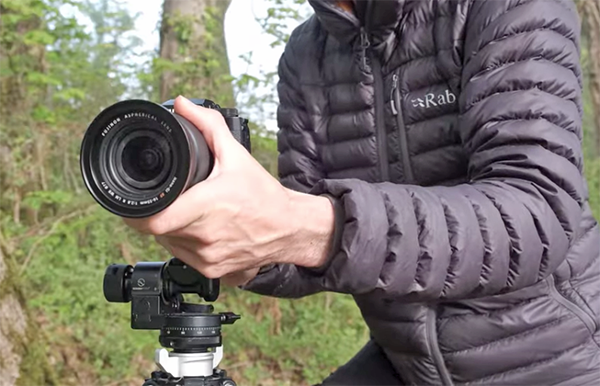
Ian Worth is a landscape pro based in Wales with a full arsenal of gear who has made a big investment in his career. Sometimes working photographers can’t avoid  subjecting equipment to hard use, but even amateurs make mistakes that can “kill” their cameras, lenses, and accessories.

Worth kicks off today’s episode like this: “I’ll share some important tips on how to protect your valuable equipment because you camera could be getting damaged without you even knowing it.” And that’s a pretty scary thought.

The sage advice Worth provides is based upon years of shooting in the great outdoors under just about any and all conditions that you can imagine. He shares unfortunate personal experiences, including a mistake he made with a costly lens, and provides a bunch of hard-earned tips on caring for your equipment—both in the field and at home.

In barely 15 minutes Worth covers it all, from choosing the right photo bag or pack, to using camera straps in the safest way possible. He also discusses how keep equipment protected during wet weather and dusty conditions. Another important consideration is cleaning your equipment properly, and that’s also part of protecting cameras and lenses from damage so that they perform with precision and last as long as possible.

The bottom line is this: Unless you’re a collector, cameras and lenses are meant to be used. But there are precautions you can take without a lot of effort that will keep your equipment in tip-top shape. And by paying close attention you will avoid making the same mistakes that Worth still regrets.

Most of the videos on Worth’s instructional YouTube involve shooting and editing tips for making the most of our beautiful world, so pay a visit and explore what’s available.

We also suggest checking out the tutorial we featured recently from another top pro that begins with this important gear question: “Do you really need a high-camera with a high-end price?” Sometimes you may be better off keeping the camera you already own and investing in high-quality optics.

Share:
Reading time: 2 min
News and Tips

10-Point Audit: Neurapix AI Plugin for LR Classic

June 22, 2024 by Louie Alma Photography No Comments

10-Point Audit: Neurapix AI Plugin for LR Classic

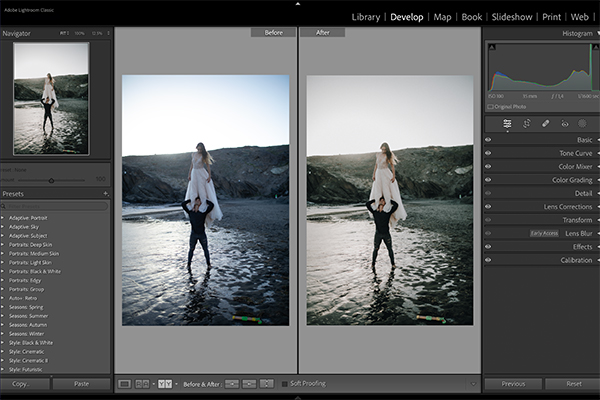
Ever wish you could wave a magic mouse and edit a large batch of Raw images in Lightroom Classic—in your own personal style—in just a minute or two? Meet Neurapix AI plugin for Adobe Lightroom Classic.
1. What Does it Do?
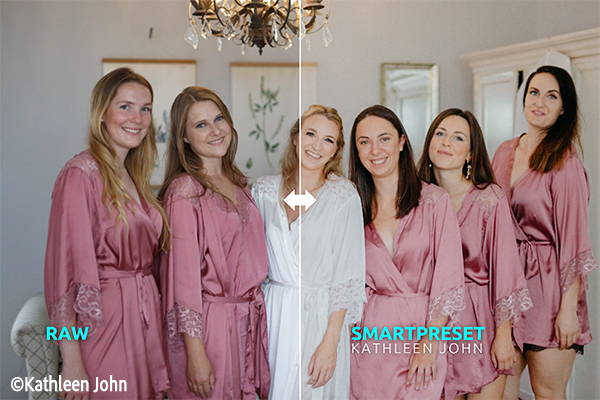
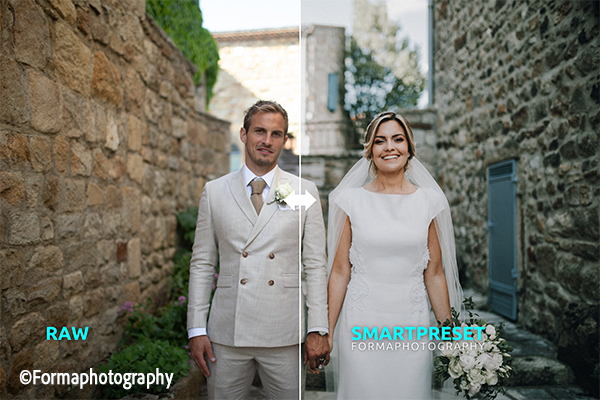
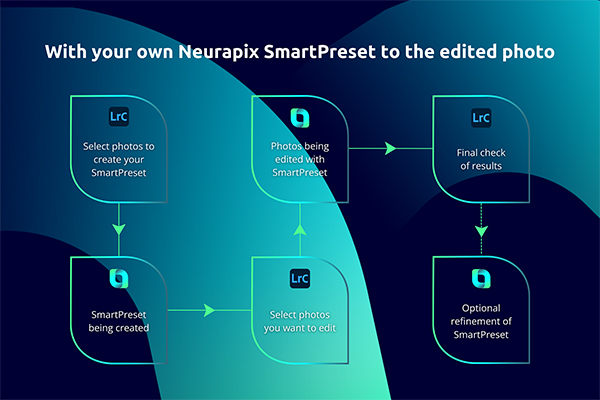
The Neurapix AI plugin for Adobe Lightroom Classic analyzes Raw images you’ve edited and learns your style and technique. After training (on as few as 20 images) Neurapix AI can edit hundreds of your photos in just minutes, applying your personal method and taste with consistent and excellent results. This process creates a Neurapix LRC SmartPreset you can use in perpetuity. You can also buy professionally-created and fully adjustable SmartPresets and apply a style you like instantly. Use the preset as-is or modify it to better suit your distinctive flair and make it your own. Sell your presets on Neurapix’s SmartPreset store. 

2. Why Do I Need it?
If you earn money with your camera, you know that postprocessing is the most time-consuming step in the transaction. Neurapix AI automates the editing using your individual style.

You gain more efficient and faster workflow because a) Neurapix AI is integrated into Light Room Classic, and b) images are processed in batches—and very, very quickly.

Low learning curve. Extremely fast ramp-up time; needs as few as 20 images to begin.

Apply consistent results across every image; you can tweak all edits, of course, and may want to refine the machine-made alterations.

Neurapix AI is very affordable, especially the pay-per-picture fee option. Process images for as little as 3¢ each. High-volume plans also available.

The overall operation is faster than any human could ever match—up to 1000 images per minute.  Spend more time with your camera and less with your computer. Save an estimated 90% of editing time. Maybe more.

Your images are protected via European Data Security, the most strict protocol around.
3. Is it Easy to Use?
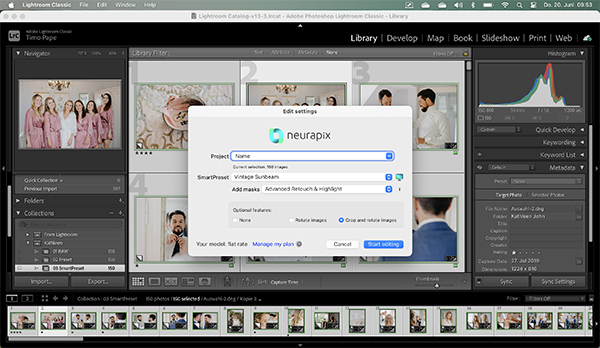
If you can use Lightroom Classic, you already know how to use Neurapix AI. Watch this YouTube video to learn how the Kickstart features get you up and running in minutes.
4. Performance
Neurapix AI does an amazing job based on your initial batch of 20 Raw images. But for finer results, training with 500 edited images makes your SmartPresets even better. It’s ready after just two hours for server editing and after two days for local editing.

At the end of the day, editing accuracy, consistency and speed are the key. Neurapix AI works exclusively as a Lightroom Classic plugin to deliver all three—at blinding speed of up to 1000 images per minute when using the pay-per-picture option and potentially even faster when using a flat rate subscription plan.
5. Drawbacks & Downsides
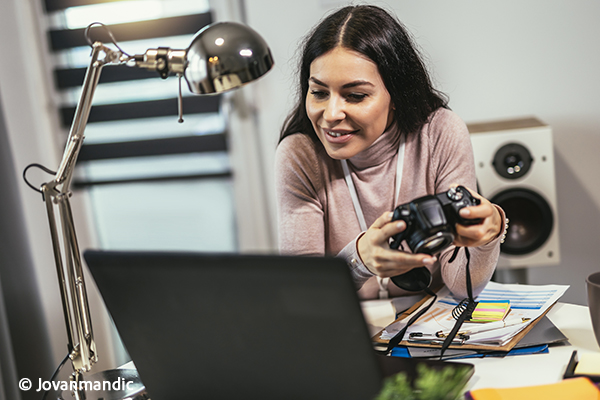
If you are not a Lightroom Classic user, you’re out luck. On a different tack, occasionally it’s necessary to override Neurapix AI’s edits either for personal taste or because infrequently, AI gets it wrong. The missteps are very few and far between, and besides—don’t we all go back sometimes and revise our initial edits?

6. What Platforms Are Compatible?
Essentially, any computer that successfully runs Adobe Lightroom Classic version 9.0 or higher.

Windows PC
Processor: At least 2 GHz Intel or AMD processor with SSE 4.2 or higher, 64-bit support. Operating system: Windows 10 (version 20H2 or higher) or Windows 11 (version 21H1 or higher). RAM: At least 8 GB, recommended 16 GB or more. Disk space: At least 4 GB free hard disk space, additional space required for installation.

Mac
Processor: At least 2 GHz Intel multi-core processor with SSE 4.2 or higher, 64-bit support, or Apple Silicon processor. Operating system: MacOS Big Sur (version 11.0) or higher. RAM: At least 8 GB, recommended 16 GB or more. Disk space: At least 4 GB free hard disk space, additional space required for installation.

7. How Do I Get it?
Download directly from Neurapix.
8. How Much Does it Cost?
The popular pay-per-picture plan starts at 3¢ per photo. Optional features, regardless of which and how many are selected, always cost an additional 1¢ cent per photo. Edits are performed on Neurapix’s servers under the pay-per-pic model.

Under the flat rate plan, editing is local and all upgrades and add-ons are included. If you edit 3000 or more images per month, the Neurapix AI flat rate plan is for you. It’s available in two flavors, $49.95 per month as an annual plan, or $79.95 on a month-to-month basis.

There are other features differences; visit Neurapix’s website for full details.

You can also edit 1,000 images free of charge before you decide to commit to the faster, more robust Flat Rate Plan. You simply cannot lose.

9. Can I Try it First?
Yes. Here’s the link to access a free trial of Neurapix AI.

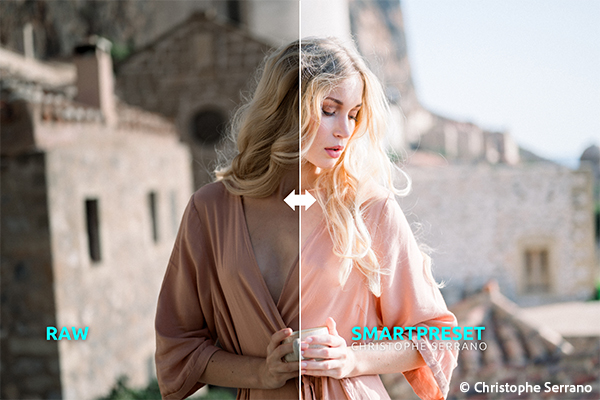
10. Before/After Examples
Become a Member of the Shutterbug Community
Register for a free account. Sign up for our newsletter. Spend five minutes (or less) uploading your best shots once every week or so. Potentially become a Shutterbug Photo of the Day winner. Enjoy viewing the fantastic work being done by thousands of photographers all over the world—and add your images to the enduring collection.


—Jon Sienkiewicz

Share:
Reading time: 4 min
News and Tips

Depth of Field: What You Don’t Know is Holding You Back (VIDEO)

June 22, 2024 by Louie Alma Photography No Comments

Depth of Field: What You Don’t Know is Holding You Back (VIDEO)

The thoughtful use of depth-of-field (DOF) techniques is a key component of every image you capture. And this holds true for landscapes with maximum sharpness throughout the frame, portraits with soft backgrounds, and clean street scenes with a minimum of clutter. Do it right and you have a successful image but make a mistake and the photo will suffer.

This tutorial from John Gress takes a deep dive into this oft-ignored and frequently misunderstood topic that can quickly make or break a shot. Gress is a successful commercial photographer whose work has been used by some of America’s largest companies, media outlets, and ad agencies for the past 20 years.

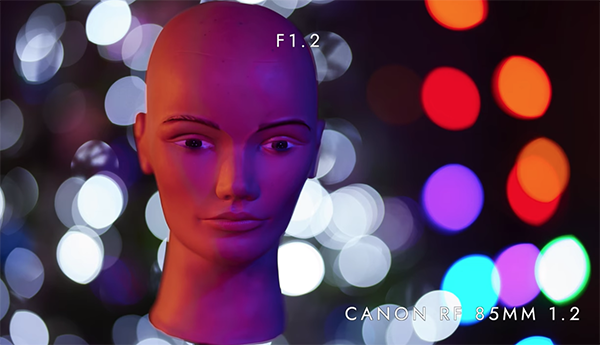
Gress describes the essence of the lesson like this: “Whether you’re obsessed with bokeh or always set your camera to f/5.6 or f/8, understanding and using depth-of-field to advantage is crucial for improving your skills.” The emphasis today is on portraiture, but everything you’ll learn can be applied to other genres as well.

Many novice photographers are under the misimpression that their best option is to shoot with prime lenses at maximum aperture. But as  you see, there’s a whole lot more to DOF than just soft, beautiful backgrounds. In fact, there are certain situations in which you’ll  be better served by stopping down the lens to expand the range of focus (rather than doing the reverse).

The tutorial begins with a brief overview of how DOF works, and why it’s so essential if capturing images with maximum impact is your goal. Gress then tackles the subject of bokeh, demonstrating the best way to achieve this popular effect.

You’ll also learn the various ways that changing the f/stop will affect sharpness and other key attributes in a photograph. The techniques described are super easy to follow because Gress illustrates them with practical demonstrations, real world examples, and clear comparisons.

Gress concludes the video with several DOF strategies for controlling what is in focus and what isn’t. Bottom line, this episode is guaranteed to help you create more interesting and compelling imagery. His instructional YouTube channel includes more helpful videos like this one, so be sure to take a look.

We also recommend watching a tutorial we featured recently with another accomplished pro who compares full-frame cameras with crop sensor models to illustrate the benefits and disadvantages of each format and the impact sensor size has on your style of photography. Hint: bigger isn’t always better.

Share:
Reading time: 2 min
News and Tips

Exploring Soft Light and Hard Light in Photography

June 22, 2024 by Louie Alma Photography No Comments

Exploring Soft Light and Hard Light in Photography

Light is the basis of all photography, and the quality of light in your photo can make or break the image. Understanding the characteristics of light and how it interacts with your subject is essential for capturing captivating photographs. In this article, I will delve into the realm of soft and hard light, both for flash photography and natural light. I’ll also explore various light modifiers that can be used to create specific effects and discuss when one type of lighting may be preferable to the other, depending on the context and mood of the shot.

Share:
Reading time: 1 min
Page 2 of 3«123»

Advertisement

Yas Island , Worlds Leading Theme Park Destination 2025 Welcomes Eid Al Fitr

March 18, 2026

5 fun family experiences in London this Easter

Lakeland’s 3-in-1 coffee machine was already affordable, but right now it’s less than £75 and will fit in even the tiniest kitchens

I don’t have a TV, but I’m seeing this viral TV stand everywhere, and it’s making me want one – and I found a budget alternative on Amazon

I’m banishing bedside clutter with this £4 Dunelm buy – I’ve been waiting months for it to come back into stock

Video Gimbals vs Video Tripod Heads

My Honest Eskimo eSIM Review and Experience After 3 Months of Travel

March 17, 2026

PARIS SOCIETY RESTAURANTS OFFER WELCOMING SPACES TO GATHER ACROSS THE UAE

FHS Africa 2026 Announces Award Recipients: Vimbai Masiyiwa and Colin Bell to Be Honoured in Nairobi

Waldorf Astoria Kuala Lumpur Unveils Landmark Culinary Collaborations

Subscribe to Our Newsletter

Check your inbox or spam folder now to confirm your subscription.

Popular Posts

LUXURY APARTMENT IN DUBAI

LUXURY APARTMENT IN DUBAI

August 20, 2020
LUXURIOUS AND SPACIOUS VILLA IN DUBAI

LUXURIOUS AND SPACIOUS VILLA IN DUBAI

Yas Island , Worlds Leading Theme Park Destination 2025 Welcomes Eid Al Fitr

March 18, 2026

Advertisement

Pages

  • 360 Interactive Virtual Tour Sample
  • About the Photographer
  • Business Portrait Photography
  • Concert Photography
  • Event Photography
  • Fashion Photography
  • Food Photography
  • Landscape Photography
  • Portrait Photography
  • Product Photography
  • Real Estate Photography
  • Sport Photography
  • Still Photography
  • Street Photography
  • Travel Photography
  • Videography

Categories

  • Apartments
  • Food Photography
  • Latest Projects
  • Luxury Residences
  • News and Tips
  • Real Estate Photography
  • Villas

Before and After Version

  • STYLISH APARTMENT IN CITYWALK, DUBAI

  • ULTRA LUXURIOUS RESIDENCE IN DUBAI

  • Real Estate Photography in Dubai, UAE

    Luxurious 7 Bed Villa with Private Pool, Cinema, Bar and Lounges at Jumeirah Golf Estates

  • LUXURY VILLA IN PALM, DUBAI

© 2020 Copyright Louie Alma Photography. All rights reserved.