The Ritz-Carlton Naples, Tiburón proudly debuts The Mouratoglou Tennis Center Naples Tiburón, marking world renowned coach Patrick Mouratoglou’s first dedicated teaching facility in Florida. This exciting partnership introduces a premiere academy in Southwest Florida, offering world-class coaching and an unparalleled tennis experience for resort guests and members. Hailing from Nice, France, Mouratoglou’s esteemed tennis program is best known for producing world-ranked tennis champions including Serena Williams (USA), Coco Gauff (USA), Holger Rune (Denmark), and Stefanos Tsitsipas (Greece).
We’ve had discussions in the past about how a heavy-handed approach to post processing can be worse than no editing at all and can really mess up an otherwise nice shot. There are also times that problems occur because of a failure to understand how common tools work, and this often results in easy-to-correct mistakes
This tutorial from one of our favorite instructors addresses the latter concern and demonstrates several common beginner Photoshop errors with straightforward solutions for doing things right. Or as landscape photographer Steve Arnold says, “There are seven sneaking editing mistakes sabotaging your landscape photos and preventing your photography from reaching the next level.”
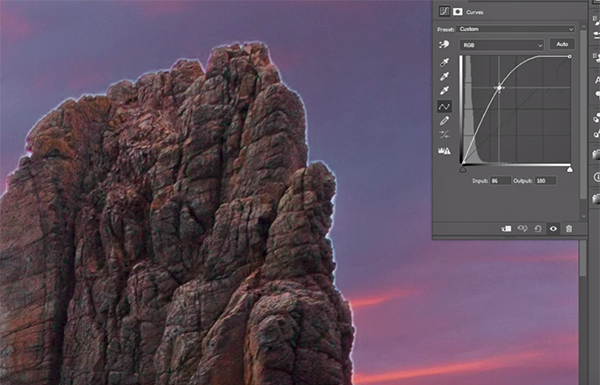
At the top of the are ugly “halos” that may appear around the edges of elements in a scene, like buildings, trees, boulders and other objects with clearly defined edges—especially when they’re photographed against a bright sky. These distracting artifacts identify you as a beginner and are created when you mask an object poorly before attempting to make adjustments.
When this happens the effect you’re attempting to create can spill over into adjacent areas in the frame, with halos being the unfortunate result. This concern is particular acute when employing Photoshop’s Select Object tool. Fortunately there’s a quick and effective fix if you follow Arnold’s advice.
Another familiar mistake is one that you may has committed more than once, and this one occurs when you go overboard attempting to brighten dark objects. Arnold explains it like this: “When you push things too far you tip the balance of what should be bright and what should be darker.” This problem is most common when you try to pull out more detail in the shadow areas within the frame and use the wrong approach. Once again, the solution is simple.
Another topic of concern is using the same technique to edit different types of images—thinking that this will provide consistency to your work. More often than not, however, you’re likely to end up with unrealistic photos.
Mistake #4 isn’t something you’re doing wrong, but rather something you’re not doing at all. This is error occurs when deciding whether or not to crop, and Arnold describes the dilemma like this: “It a trap photographers fall into because they want as much image as possible, and it feels like a shame to “waste” data by cropping a photo and reducing pixels.”
The salient question is this: Would you rather have a full resolution photo with OK composition, or a slightly reduced file with perfect composition? There are three more mistakes to go and you’ll have to watch the video to see what they are and learn the related solutions. When the video concludes be sure to check out Arnold’s popular YouTube channel for more shooting and post-processing techniques.
If you’ve ever tried removing extremely complex objects from an image, you probably tried doing so using Generative Fill. It’s likely that the results you received weren’t up to par because Gen Fill often delivers poor results no matter how many times you try. In fact, in some circumstances like this one it may even replace objects rather than eliminate them.
This tutorial comes to us from the PiXimperfect YouTube channel, a robust instructional resource with more than five million subscribers. In this episode you’ll learn a foolproof technique to vaporize complicated, unwanted objects that ruin a shot.
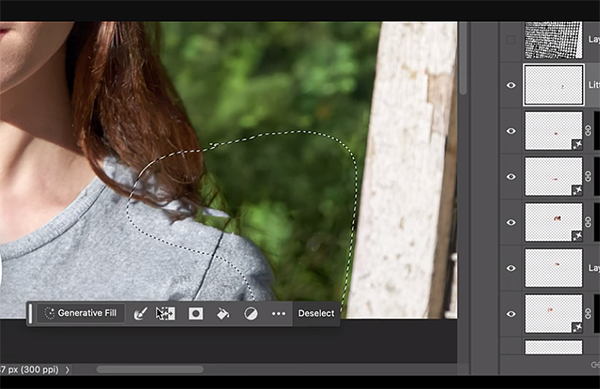
Unmesh Dinda is globally popular educator, post-processing expert and workshop instructor who travels the world sharing his wisdom with others. He begins this 12-minute primer on object removal by explaining why Generative Fill isn’t the solution for detailed elements like the fence in his demonstration portrait.
As Dinda explains, Gen Fill not only fails at this particular task, but when it works there are several drawbacks to consider. One of these involves resolution limitations, and Dinda puts it like this: “As soon as you zoom in, all those filled areas are super, super, duper low-res.”
So what’s Dinda’s secret to getting rid of the fence with precision in a way that makes it look like it was never, ever there? The solution involves using the right approach to applying Content Aware Fill, Generative Fill, and Photoshop’s Remove too to achieve high-quality results.
Once you get the hang of it (and it doesn’t take long) you’ll be able to easily and effectively remove any offensive elements from images forever more. He demonstrates the procedure from beginning to end, which begins by selecting the fence and applying a basic fill. Then you’ll learn his technique for “filling by area.”
Dinda also demonstrates how to fix the subject’s eyes, perfect her lips, and he addresses a few bigger issues as well. There are tiny refinements too that are easily rectified with Photoshop’s straightforward Remove tool.
There’s one final step once the image is cleaned up, and Dinda explains it like this: “I’ll Liquify the correct proportions and sizes,” and he illustrates how that’s accomplished. Then you have an absolutely precise transformation with nary a fence in sight.
The PiXimperfect YouTube channel contains an abundance of post-processing lessons for both beginners and experienced users, so be sure to visit often.
One great way to gain recognition for your hard-earned work is to hang framed, oversized prints in your home or office where you can enjoy them too. But there are a few thing to know before sending files off to the lab so that they can deliver the best possible output.
This tutorial from the Dream Life Photography YouTube channel explains everything you need to understand for making the correct settings in Lightroom and Photoshop when upscaling an image. Woods is a professional photographer, specializing in travel imagery, surf photos, and spectacular seascapes, and he’s very generous about sharing the secrets to his success.
Woods pulls up a beautiful golden-hour ocean scene with a solitary sailboat near the horizon. He demonstrates how to export the shot with all the proper settings while working in Lightroom Classic. Clicking on Export brings up a detailed window with all the options that need to be properly configured to assure that you receive prints with maximum image quality.
You can do much the same when working in Photoshop with a few minor differences and woods explains what they are. In any case, there’s a sizable list of key settings and Woods walks you through all the essential options that are available to suit your specific needs.
The process may seem cumbersome the first time you give it a try, and we suggest writing down the configuration you use so that the next time your order large prints it will be a breeze to get everything right.
All reputable labs have a comprehensive list of guidelines with pricing information for print of various sizes, their specific requirements with regard to file format, color space and other key variables. This spec sheet will also delineate the different papers available, and it’s important to review it carefully before placing an order.
Some labs also provide basic image-editing services and will even mat and frame the finished product before returning your order. So pay close attention to Wood’s expert advice, and then make sure you provide the lab with all the details they request.
Bottom line: the time you spend getting everything prepared will pay dividends with big prints that impress your friends and make you very proud. There are many more helpful videos on the Dream Life Photography YouTube channel, so be sure to take a look and subscribe.
We also recommend watching a tutorial we posted earlier from another expert who explains how some Lightroom and Photoshop users ruin their photographs by taking post-processing too far.