

Freelance Photographer in Dubai, UAE - Experienced, Sophisticated, Affordable & Reliable
  • Home
  • Photography
    • Real Estate Photography
    • Landscape Photography
      • Travel Photography
      • Street Photography
    • Portrait Photography
      • Business Portrait Photography
      • Fashion Photography
    • Food Photography
    • Product Photography
    • Event Photography
      • Concert Photography
    • Sport Photography
    • Still Photography
  • Videography
    • 360 Interactive Virtual Tour
  • Latest Projects
  • News & Tips
  • Contact
Home
Photography
    Real Estate Photography
    Landscape Photography
    Travel Photography
    Street Photography
    Portrait Photography
    Business Portrait Photography
    Fashion Photography
    Food Photography
    Product Photography
    Event Photography
    Concert Photography
    Sport Photography
    Still Photography
Videography
    360 Interactive Virtual Tour
Latest Projects
News & Tips
Contact
Freelance Photographer in Dubai, UAE - Experienced, Sophisticated, Affordable & Reliable
  • Home
  • Photography
    • Real Estate Photography
    • Landscape Photography
      • Travel Photography
      • Street Photography
    • Portrait Photography
      • Business Portrait Photography
      • Fashion Photography
    • Food Photography
    • Product Photography
    • Event Photography
      • Concert Photography
    • Sport Photography
    • Still Photography
  • Videography
    • 360 Interactive Virtual Tour
  • Latest Projects
  • News & Tips
  • Contact
News and Tips

Use LR’s Color Mixer to Improve Hue, Saturation & Luminance (VIDEO)

August 22, 2024 by Louie Alma Photography No Comments

Use LR’s Color Mixer to Improve Hue, Saturation & Luminance (VIDEO)

Are you looking for a simple and effective Lightroom technique that will dramatically enhance images as quickly as possible so you can get back out in the field doing what you love most? If so, we’ve got you covered with today’s game-changing tutorial from post-processing impresario Julienne Kost.

Kost is an acclaimed author, educator, workshop instructor, and an expert at all things Adobe. In less than four minutes you’ll learn a transformative method for using Lightroom’s versatile Color Mixer tools to adjust Hue, Saturation, and Luminance so that your photos are greeted with one word: WOW!

The quick lesson kicks off with this: “In the next few minutes we’re going to see how easy it is to change different colors in a photograph using the Mixer options in Lightroom’s Color Mixer panel.” This straightforward method is all about understanding how to make adjustments within a specific color range to achieve an impressive and realistic look.
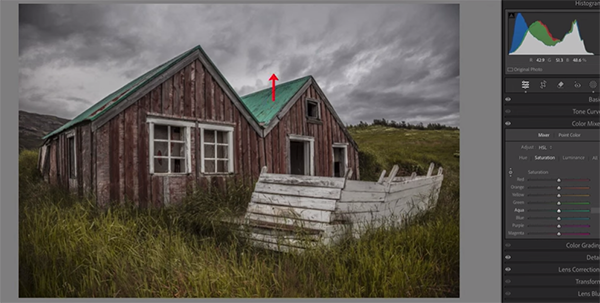
Kost notes that there are two ways to view the Color Mixer options. “We can choose to make our adjustments using HSL or Color.” HSL provides access to all the color ranges, and there’s a choice between making enhancements with Hue, Saturation, or Luminance. You can also click on “All” to reveal all of these options and enhance photos with all three tools simultaneously.

If you decide to employ the Color approach instead, the options for doing so are rearranged. Now you can select any single color range and then adjust Hue, Saturation and Luminance values for that specific range. And by tapping an icon you can view all the ranges at once.

One of the advantages of making enhancements with HSL instead of Color is that you can employ Lightroom’s powerful Targeted Adjustment tool to get the job done. Kost returns to the HSL layout and explains how everything works—beginning by modifying Hue. Here the goal is to accentuate green tones in the foreground of her abandoned house image. As you’ll see, it’s a simple matter of dragging up or down.

She then moves on to a more complex image to illustrate another effective technique for enhancing and balancing all of the tones until you achieve exactly the look you’re after. Kost’s instructional YouTube channel has over 50,000 subscribers and 200 helpful videos, so be sure to check it out.

We also recommend watching the tutorial we featured recently with another adept post-process instructor who demonstrates how to use Lightroom’s Linear Gradient tool to create attention-grabbing nature, travel, and landscape photographs.

Share:
Reading time: 2 min
News and Tips

Photoshop’s Hidden Depth Mask Tool Makes Photos Look 3D (VIDEO)

August 22, 2024 by Louie Alma Photography No Comments

Photoshop’s Hidden Depth Mask Tool Makes Photos Look 3D (VIDEO)

Whenever Adobe updates their software  it seems like one or two features grab all the headlines, like Photoshop’s recent Lens Blur capabilities. At the same time, other powerful tools tend to be overlooked as you’ll see in this tutorial from our friends at PiXimperfect .

Instructor Unmesh Dinda is one of the world’s most popular post-processing experts—with over five million subscribers to his instructional YouTube channel. In this episode he reveals an “undercover” new feature known as Depth Map masks that he says everyone should understand and add to their everyday Photoshop workflow.

In this compressive video you’ll learn how to employ Depth Maps to create “incredible atmospheric effects and make your photos POP?” As you’ll see, Dinda’s edited images almost look three-dimensional (and there’s no goofy glasses to wear).

The process of generating Depth Maps and converting them to masks sounds far more complicated than it really is, and by following Dinda’s step-by-step instructions you’ll be able to get the job done—even if you’re a beginning Photoshop user.

By selecting Visualize Depth you’ll see a map that illustrates which areas are further from the camera and those that are closer. Photoshop automatically creates the map, and a quick glance enables you to use this information to selectively blur certain portions of the shot while leaving other areas  in the frame untouched.

Dinda explains that “if we turn this off we can change which areas we want to keep in focus and which areas we want to blur.” As you can expect, this of-ignored technique is particularly useful for landscape photographers and just about anyone else who captures images in the field. Dinda uses an already nice landscape photo to demonstrate the spectacular possibilities.

One reason it’s so important to control the zone of sharpness is to accentuate a particular element (or elements) by deemphasizing surrounding areas. Dinda demonstrates how to do this with a depth Map to achieve the effect known as “Contrast Separations and much more.

You’ll also learn mistakes to avoid, a great way to use a Depth Map to enhance a sky, blur a background, and add the appearance of grain. Dinda also demonstrates how this powerful tool can be valuable when color grading your images.

There’s much more to learn on Dinda’s globally popular YouTube channel, so be sure to pay a visit when you have plenty of time to explore and become one of his five million fans.

And don’t miss the tutorial we featured with another post-processing specialist who demonstrates a powerful shooting and editing technique that will significantly increase the Dynamic Range of your photographs.

Share:
Reading time: 2 min
News and Tips

Nikon Z 50mm f/1.2 S Review

August 22, 2024 by Louie Alma Photography No Comments

Nikon Z 50mm f/1.2 S Review

This hands-on review covers everything that you need to know about the Nikon Z 50mm f/1.2 S, an ultra-bright prime lens available for the Z System. Although it’s large, heavy, and expensive, there’s a lot to like where image quality and capabilities are concerned. Here’s how it measures up.

Share:
Reading time: 1 min
Page 3 of 3«123

Advertisement

Saint Lucia Jazz & Arts Festival unveils 2026 lineup

February 14, 2026

SAUDI ARABIA ANNOUNCES 2026 FUTURE AVIATION FORUM TO CONVENE GLOBAL AVIATION LEADERS

Opening of the Tuwaiq Sculpture 2026 Exhibition Marks Seventh Edition

February Brings Flavor, Excitement, and Fiesta at Sunset World Group Hotels

The “Field of Light,” an icon of world art in Uluru, celebrates its tenth anniversary

3 clever tile layouts and combinations that will give your bathroom an original and stylish refresh (and still look good five years on)

Behind every tidy home is a clever organiser doing all the heavy lifting – this £10 buy will make your home look instantly neater

I saw Next’s spring-ready ‘Decorator’ collection IRL – and I can confirm that it looks and feels just as expensive in person as it does in pictures, if not more

Ninja just dropped its first-ever gas BBQ in the UK – if you’re looking for an all-in-one outdoor cooking system, you need to see this

Stacey Solomon has shared the bargain buy she uses to dry bedding when it’s raining outside – no tumble dryer required!

Subscribe to Our Newsletter

Check your inbox or spam folder now to confirm your subscription.

Popular Posts

LUXURY APARTMENT IN DUBAI

LUXURY APARTMENT IN DUBAI

August 20, 2020
LUXURIOUS AND SPACIOUS VILLA IN DUBAI

LUXURIOUS AND SPACIOUS VILLA IN DUBAI

Saint Lucia Jazz & Arts Festival unveils 2026 lineup

February 14, 2026

Advertisement

Pages

  • 360 Interactive Virtual Tour Sample
  • About the Photographer
  • Business Portrait Photography
  • Concert Photography
  • Event Photography
  • Fashion Photography
  • Food Photography
  • Landscape Photography
  • Portrait Photography
  • Product Photography
  • Real Estate Photography
  • Sport Photography
  • Still Photography
  • Street Photography
  • Travel Photography
  • Videography

Categories

  • Apartments
  • Food Photography
  • Latest Projects
  • Luxury Residences
  • News and Tips
  • Real Estate Photography
  • Villas

Before and After Version

  • STYLISH APARTMENT IN CITYWALK, DUBAI

  • ULTRA LUXURIOUS RESIDENCE IN DUBAI

  • Real Estate Photography in Dubai, UAE

    Luxurious 7 Bed Villa with Private Pool, Cinema, Bar and Lounges at Jumeirah Golf Estates

  • LUXURY VILLA IN PALM, DUBAI

© 2020 Copyright Louie Alma Photography. All rights reserved.



