Freelance Photographer in Dubai, UAE - Experienced, Sophisticated, Affordable & Reliable
  • Home
  • Photography
    • Real Estate Photography
    • Landscape Photography
      • Travel Photography
      • Street Photography
    • Portrait Photography
      • Business Portrait Photography
      • Fashion Photography
    • Food Photography
    • Product Photography
    • Event Photography
      • Concert Photography
    • Sport Photography
    • Still Photography
  • Videography
    • 360 Interactive Virtual Tour
  • Latest Projects
  • News & Tips
  • Contact
Home
Photography
    Real Estate Photography
    Landscape Photography
    Travel Photography
    Street Photography
    Portrait Photography
    Business Portrait Photography
    Fashion Photography
    Food Photography
    Product Photography
    Event Photography
    Concert Photography
    Sport Photography
    Still Photography
Videography
    360 Interactive Virtual Tour
Latest Projects
News & Tips
Contact
Freelance Photographer in Dubai, UAE - Experienced, Sophisticated, Affordable & Reliable
  • Home
  • Photography
    • Real Estate Photography
    • Landscape Photography
      • Travel Photography
      • Street Photography
    • Portrait Photography
      • Business Portrait Photography
      • Fashion Photography
    • Food Photography
    • Product Photography
    • Event Photography
      • Concert Photography
    • Sport Photography
    • Still Photography
  • Videography
    • 360 Interactive Virtual Tour
  • Latest Projects
  • News & Tips
  • Contact
News and Tips

RAW Photo Processing Basics from Start to Finish (VIDEO)

August 23, 2024 by Louie Alma Photography No Comments

RAW Photo Processing Basics from Start to Finish (VIDEO)

Most photographers understand why shooting in Raw provides maximum image detail and other key attributes that contribute to ultimate image quality. Another benefit of using this format is that it delivers far more control during the image-editing process.

Despite these advantages, however, many folks set their cameras to capture Jpegs because they think the task of processing Raw files is too complex for their rudimentary skills. This tutorial from Instructor Darren J. Spoonley allays these concerns by demonstrating a simple Raw editing walkthrough from beginning to end.

Spoonley is a seasoned Irish pro who says he specializes in landscape and seascape photography because he loves the everchanging, unpredictable beauty that these scenes display. Today’s episode is another installment of his Behind the Raw series in which he meticulously dissects a recent image and demystifies the intricacies of his editing journey.

While watching Spoonley get the job done from initial capture to final adjustments you’ll gain practical insights and strategies for improving your photographs by making the leap from Jpeg to Raw. And the beautiful image he uses to illustrate the workflow is guaranteed to inspire.

One of the challenges Spoonley faced for the session you see today was the sheer number of people at his location. As he says, “There were people on the rocks, people in the water and people leaving and arriving every few minutes”—as often happens at spectacular destinations.

This particular edit is super simple for several reasons. First, Spoonley was using a telephoto lens to isolate interesting patterns in the waterfall and rocks; hence, many distractions were eliminated from the scene. He chose the composition you see here “because I like how the rocks act as a frame at the bottom..
Spoonley used an aperture of f/4 to allow the waterfall to fade into the background with some pretty nice bokeh. Thus, “All I needed to do for this Raw edit was to bring out the texture in the water. I felt that the small fingers of water worked well as they headed down the scene.”

So watch how it’s done and choose a simple scene of your own for your first foray into the exciting world of shooting and editing in Raw. Be sure to visit Spoonley’s YouTube channel where you can watch past and future episodes of this enlightening series.

And don’t miss the tutorial we posted earlier from another post-processing expert who demonstrates how to use Photoshop’s transformative Depth Mask tools to create mind-blowing outdoor photographs that almost look three dimensional.

Share:
Reading time: 2 min
News and Tips

Beginners Guide to Star Trail Photos: Gear, Camera Settings & More (VIDEO)

August 23, 2024 by Louie Alma Photography No Comments

Beginners Guide to Star Trail Photos: Gear, Camera Settings & More (VIDEO)

This tutorial is for those of you who’ve marveled at spectacular star trail images of the nighttime sky but thought this unique style of landscape photography was beyond your skills. Today you’ll learn how to get the job done with the gear you already own.

Educator Forest Chaput de Saintonge is an accomplished outdoor photographer and former Director of the Rocky Mountain School of Photography. He describes himself as an “astronomy nerd,” so he’s the perfect instructor for this nine-minute primer.

Forest kicks off today’s episode like this: “We break down the exact settings and equipment you need to capture clear well-exposed images of the night sky and showcase the movement of the stars overhead. Along the way you’ll pick up valuable advice on composition, exposure, and focusing techniques.

This behind-the-scenes lesson begins on a moon-filled night in the woods with Forest’s camera mounted atop a sturdy tripod. He notes as an aside that “the Milky Way is out of the question tonight because you need a cloudless night” for tackling this task.

A tripod is absolutely essential and Forest recommends a wide-angle lens in the range of 24-35mm to fit the expansive scene within the frame. Extra batteries are important as well because the long exposures required use up a lot of juice. He also explains why the small device known as an intervalometer is another helpful accessory to consider.

The first thing you want to do with regard to camera settings is to make sure that the Mode dial is set to Manual. Forest explains the necessity of  “full control over Aperture, Shutter Speed and ISO” for this style of shooting. He then chooses the maximum aperture available (in his case that’s f/1.4). He also discusses why “autofocus doesn’t work at night” and how to focus manually for precise acquisition.

Forest also recommends shooting in Raw for optimum image quality and maximum control during post-processing. Selecting the Continuous High Drive mode is also key for reasons that he explains. Surprisingly, you’ll want to set White Balance to Daylight to imbue stars with balanced, neutral colors.

Then there are three settings to disable: High ISO Noise Reduction, Long Exposure Noise Reduction, and Image Stabilization. Once all the general settings are properly configured Forest move on to shooting considerations like composition, specific focusing techniques, and others that differ from those you employ when capturing photographs during the day.

Once you’re done watching head over to Forest’s instructional YouTube channel where you’ll learn how to master other interesting tasks that you thought were out of reach.

And for another dramatic technique, don’t miss our earlier tutorial that demonstrates how to shoot attention-grabbing nature and wildlife photographs with your subjects in silhouette.

Share:
Reading time: 2 min
News and Tips

The BEST Photo Export Settings for Prints, Web Use & More (VIDEO)

August 23, 2024 by Louie Alma Photography No Comments

The BEST Photo Export Settings for Prints, Web Use & More (VIDEO)

Have you ever captured a great image, edited it perfectly, uploaded it to the web or made a print, and then said to yourself “that’s not how I remember this photo looking after post processing?” If so, it’s possible that the Lightroom Export settings were incorrect for the way you intended to share the shot.

Instructor Lachlan Garutti is an Australian pro specializing in landscape, travel, and adventure photography, and in this video he reveals the Export Settings he prefers so that there are no surprises when you view your images on Instagram, Facebook, your online portfolio, or when examining a high-res print.

He says the following when it comes to preparing a photo for social media usage: “Every time you upload to Instagram or Facebook, the site compresses your images to make them easier to load.” The problem is that the resizing process causes a loss of quality with regard to sharpness, saturation, contrast, color, and other important attributes.

The good news, however, is that your imagery will look great by using the Export settings that Garutti recommends in the 10-minute video below. You’ll also learn how easy it is to make a few timesaving presets that are optimized for a variety of low- and high-resolution purposes. This way you’ll have a one-click solution for most-common exporting tasks.

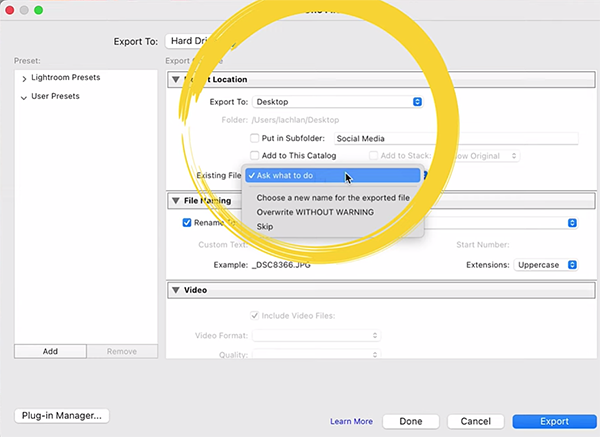
The settings you’re looking for can found within Lightroom’s Develop tab. Then simply navigate to the photo you want to export. One you click on File atop the screen and choose Export from a dropdown menu that appears, you’ll be presented with a variety of options.

After demonstrating the best configuration for Instagram,  Garutti turns his attention to modifying these settings for using images in different ways. He explains why her prefers exporting photos to the desktop or in a clearly labeled sub-folder, rather than adding them to a Lightroom catalog.

The process includes making the right choice for File format, Quality, Color Space, Image Size, Resolution, and other important settings like Aspect Ratio. And if you follow his advice for creating presets, you’ll only have to do this once for each configuration you want to save.

Garutti’s instructional YouTube channel contains many more straightforward shooting and editing videos like this one, so be sure to take a look.

And don’t miss the recent tutorial we featured with another accomplished shooter who demonstrates how to harness the power of Lightroom’s Color Mixer tools to create photographs with perfect Hue, Saturation, and Luminance.

Share:
Reading time: 2 min
News and Tips

Nikon Z Cameras: What to Do When Subject Detection Fails

August 23, 2024 by Louie Alma Photography No Comments

Nikon Z Cameras: What to Do When Subject Detection Fails

Since the debut of the Z System in 2018, Nikon cameras have taken a giant leap forward in terms of autofocus performance. The original Z6 and Z7 models, with which Nikon entered the mirrorless waters, could only detect the eyes of humans, dogs, and cats. And today? Their newest cameras can detect the “eyes” of almost anything that moves, including vehicles. However, relying solely on advanced AF algorithms would be overly optimistic. As good as the subject detection is in modern Nikon Z cameras, there are times when it simply fails. What do you do then?

Share:
Reading time: 1 min
Page 2 of 2«12

Advertisement

Sandals Dunn’s River Set the Stage as NBC’s ‘TODAY with Jenna & Sheinelle’ Broadcast

March 29, 2026

Croissants have been the breakout home decor trend this spring – Aldi’s new croissant-scented candle is the latest must-have to add to your collection

Wildlife experts say you can feed garden birds leftover cooked pasta – here are the surprising benefits

Simba has just launched an Amazon-exclusive mattress that only costs £349 – it’s nearly half the price of its normal 5-star rated range

Primark’s new homeware range is giving ‘citrus summer’, and shoppers are obsessed – these are 6 sunny picks Instagram can’t get enough of

An Easy HDR Workflow: The Ponta de São Lourenço Case Study

THE RITZ-CARLTON ORLANDO, GRANDE LAKES DEBUTS SIGNATURE EXPERIENCES

March 28, 2026

Hotel Sacher Vienna celebrates its 150th anniversary – with sculptures by Erwin Wurm

Majority of U.S. travelers now use AI for trips, marking fastest behavioral shift in a decade

Discover the perfect place to celebrate Easter and stay at Rome Cavalieri

Subscribe to Our Newsletter

Check your inbox or spam folder now to confirm your subscription.

Popular Posts

LUXURY APARTMENT IN DUBAI

LUXURY APARTMENT IN DUBAI

August 20, 2020
LUXURIOUS AND SPACIOUS VILLA IN DUBAI

LUXURIOUS AND SPACIOUS VILLA IN DUBAI

LUXURY VILLA IN PALM, DUBAI

LUXURY VILLA IN PALM, DUBAI

August 26, 2020

Advertisement

Pages

  • 360 Interactive Virtual Tour Sample
  • About the Photographer
  • Business Portrait Photography
  • Concert Photography
  • Event Photography
  • Fashion Photography
  • Food Photography
  • Landscape Photography
  • Portrait Photography
  • Product Photography
  • Real Estate Photography
  • Sport Photography
  • Still Photography
  • Street Photography
  • Travel Photography
  • Videography

Categories

  • Apartments
  • Food Photography
  • Latest Projects
  • Luxury Residences
  • News and Tips
  • Real Estate Photography
  • Villas

Before and After Version

  • STYLISH APARTMENT IN CITYWALK, DUBAI

  • ULTRA LUXURIOUS RESIDENCE IN DUBAI

  • Real Estate Photography in Dubai, UAE

    Luxurious 7 Bed Villa with Private Pool, Cinema, Bar and Lounges at Jumeirah Golf Estates

  • LUXURY VILLA IN PALM, DUBAI

© 2020 Copyright Louie Alma Photography. All rights reserved.