Freelance Photographer in Dubai, UAE - Experienced, Sophisticated, Affordable & Reliable
  • Home
  • Photography
    • Real Estate Photography
    • Landscape Photography
      • Travel Photography
      • Street Photography
    • Portrait Photography
      • Business Portrait Photography
      • Fashion Photography
    • Food Photography
    • Product Photography
    • Event Photography
      • Concert Photography
    • Sport Photography
    • Still Photography
  • Videography
    • 360 Interactive Virtual Tour
  • Latest Projects
  • News & Tips
  • Contact
Home
Photography
    Real Estate Photography
    Landscape Photography
    Travel Photography
    Street Photography
    Portrait Photography
    Business Portrait Photography
    Fashion Photography
    Food Photography
    Product Photography
    Event Photography
    Concert Photography
    Sport Photography
    Still Photography
Videography
    360 Interactive Virtual Tour
Latest Projects
News & Tips
Contact
Freelance Photographer in Dubai, UAE - Experienced, Sophisticated, Affordable & Reliable
  • Home
  • Photography
    • Real Estate Photography
    • Landscape Photography
      • Travel Photography
      • Street Photography
    • Portrait Photography
      • Business Portrait Photography
      • Fashion Photography
    • Food Photography
    • Product Photography
    • Event Photography
      • Concert Photography
    • Sport Photography
    • Still Photography
  • Videography
    • 360 Interactive Virtual Tour
  • Latest Projects
  • News & Tips
  • Contact
News and Tips

How to Add or Enhance Light in Outdoor Photos with Levels & Curves Masks in Photoshop (VIDEO)

October 24, 2024 by Louie Alma Photography No Comments

How to Add or Enhance Light in Outdoor Photos with Levels & Curves Masks in Photoshop (VIDEO)

There’s a four-word motto that pretty much sums up the art of photography: Get the light right. Unfortunately that’s easier said than done—especially when shooting outdoors under dull or uneven illumination. If you’re willing to spend a few minute in Photoshop, however, it’s not difficult to enhance what’s there or introduce additional light of your own,.

Today’s instructor Sandra is a successful Australian pro who specializes in post-processing tutorials that anyone can use to boost creativity and give photos a variety of unique effects. In this episode she demonstrates how to use selections and adjustment layers like Levels and Curves to create images that really grab attention.

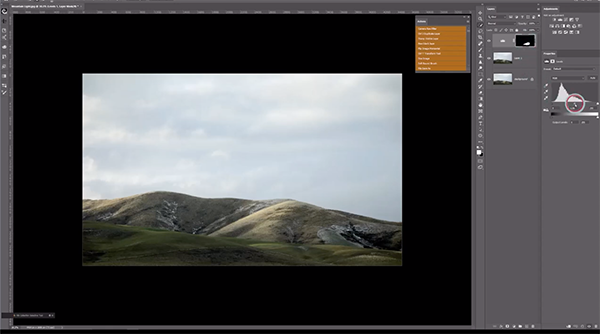
Sandra refers to this Photoshop technique as “sculpting light,” and she pulls up an unremarkable landscape scene with a pale blue bright sky and dull mountains on the horizon. But watch what happens when she works her magic by introducing light and shade onto the mountains using Levels and Curves adjustment layers.
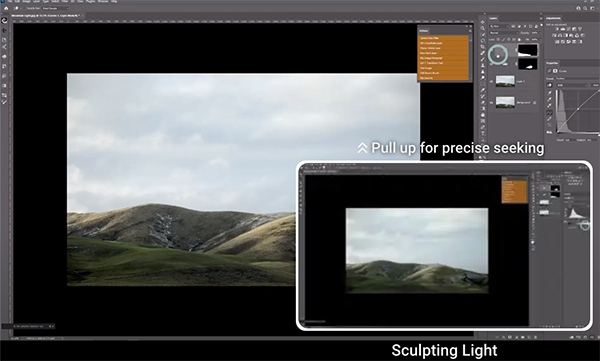
As you’ll, see Sandra’s approach can be easier and more effective than the common method of dodging and burning. She describes the various selection tools available, why she chooses Photoshop’s Quick Selection option for this particular task, and then demonstrates how easy it is to use.

Next comes the equally simple process of creating the Layers and Curves masks that enable you to make selective adjustments to different portions of the scene without biasing surrounding areas. Then you’ll watch Sandra make a variety of local enhancements that transform her original photo into a far more appealing image.

The entire process is so straightforward that we’ll refrain from summarizing it here. Just watch Sandra demonstrate the steps and you’ll be duly impressed. Then check out her instructional YouTube channel for more user-friendly post-processing tips and technique.
And don’t miss the earlier tutorial we featured with another image-editing expert who demonstrates a remarkable Photoshop technique for removing distracting fences between you and your subject.

Share:
Reading time: 1 min
News and Tips

5 Reasons for Unsharp Photos & Fixes with DSLRs & Mirrorless Cameras (VIDEO)

October 24, 2024 by Louie Alma Photography No Comments

5 Reasons for Unsharp Photos & Fixes with DSLRs & Mirrorless Cameras (VIDEO)

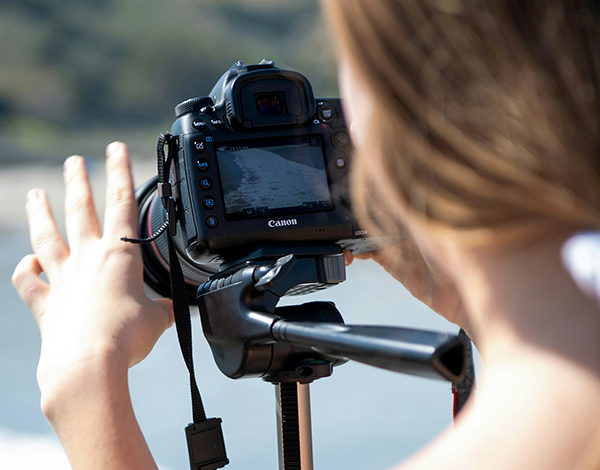
There’s nothing more frustrating than capturing a great scene and discovering that your photos lack critical focus. If this happens to you on a regular basis, pay close attention to the following tutorial from the E-Squared YouTube channel hosted by two twin sisters who post weekly videos with straightforward photography advice.

Emily is today’s instructor and she reveals five common reasons for blurry images and solutions for getting things right when shooting with a mirrorless camera or DSLR. She covers a lot of ground in barely 10 minutes, discussing everything from focus-mode mistakes and incorrect aperture/shutter speeds settings, to choosing the wrong focus point for the task at hand

The first topic of conversation is selecting the best focus mode for a particular situation, and Emily describes the difference between AF-S (autofocus single) and AF-C (autofocus continuous), and she explains why she “always, always” uses the latter. Many photographers switch to AF-S when photographing static scenes, but Emily ignores conventional wisdom and consider AF-C a set-it-and-forget-it choice.

Mistake number two comes down to shutter speed, and how the wrong choice will invariably result in soft photos unless your camera is mounted atop a sturdy tripod. Emily recommends 1/250 or higher as a safe starting point. You’ll also learn why she recommends shooting in Manual, and there’s a link in the description beneath the video to an earlier episode devoted to this.

Image stabilization settings are also part of the equation. Aperture settings are next on the list, and you’ll see why “too wide of apertures (like f/1.8) can cause out-of-focus and blurry images.” The culprit here is insufficient depth of field, and Emily recommends the best f/stop to use for various situations and conditions.

The lesson concludes with a thoughtful discussion of autofocus points, and you’ll see why focusing on the wrong spot within the frame is guaranteed to spoil an otherwise nice photograph. Once again, she describes various scenarios and how to get things nice and sharp by making an intelligent choice.

The E-Squared YouTube channel is a great resource for beginning photographers who want to quickly take their imagery to the next level.

And on a related topic, don’t miss the earlier tutorial we posted that describes how to decide whether to use a camera’s optical viewfinder, electronic viewfinder, or shoot in Live View mode, and the implications of each for attaining precise focus.

Share:
Reading time: 2 min
News and Tips

Want Vibrant Fall Photos? Use this Hidden Profile in Lightroom (VIDEO)

October 24, 2024 by Louie Alma Photography No Comments

Want Vibrant Fall Photos? Use this Hidden Profile in Lightroom (VIDEO)

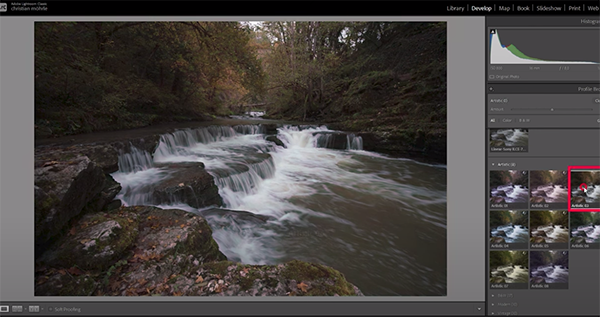
Did you know that there’s a “hidden” Lightroom profile that accentuates the color of fall foliage while retaining a realistic look? This tutorial from the PHLOG Photography YouTube channel explains where to find it and how to put it to work.

German landscape photographer Christian Mohrle is  one of our favorite post-processing instructors, and his tutorials are designed for beginners and experienced Lightroom users alike.  Today he reveals “a hidden Lightroom profile that improves the color of your autumn photos and really make them POP.”

We suggest downloading Mohrle’s Raw file with the link beneath his video so you can make the adjustments yourself as the simple steps are explained. The sample shot was captured astride a bubbling stream and is nicely composed, but the colors of the surrounding trees are far too drab to grab attention.

Mohrle refers to the problem-solving profile as “hidden” because it doesn’t appear in the Profile dropdown menu within Lightroom’s Basic panel. Oddly, this super effective option resides in the Artistic menu instead where there are a variety of other oft-ignored profiles. Some of these are a bit strange, while others provide unique color tones that you may want to try.

The appropriate option for today’s task is known as Artistic Free. Once you make this selection and close the browser panel your image is immediately much improved. You’ll notice that green colors in the foliage take on more of an orange autumn tone. Yet the default settings are way too strong, and Mohrle demonstrates how to achieve a natural-looking result by carefully moving a few sliders.

Mohrle is a perfectionist (and you should be too) so he makea a variety of global enhancements to the scene in its entirety. Once he’s satisfied with his “base image” it’s time to use a few masks to selectively adjust various areas within the frame.

He completes the impressive transformation with some final color grading and judicious sharpening, while holding your hand throughout the entire process so you’ll understand all the finer points involved. There’s much more to learn on Mohrle’s instructional YouTube channel, so make it a point to visit when you have time to explore.

We also suggest watching the tutorial we featured earlier from a professional landscape and wildlife shooter who explains how a camera’s Dynamic Range affects every photograph you capture in the field.

Share:
Reading time: 2 min
News and Tips

Canon Announces Student CPS Program for Student Photographers & Filmmakers

October 24, 2024 by Louie Alma Photography No Comments

Canon Announces Student CPS Program for Student Photographers & Filmmakers

Absolutely free support for emerging image makers: qualified college-level students 18 and older may now be eligible to enjoy many of the valuable member-exclusive benefits Canon previously reserved for full-time professional photographers via the new Student Canon Professional Services program — all at no cost. The generous initiative includes perks ranging from expedited repairs and discounted repair services to a dedicated hotline for assistance and mentorship.

CPS Student members receive multiple benefits including:
• Exclusive purchase offers through Canon’s online store
• Free Canon Maintenance Service, up to two products per year
• 10% discount on repairs, up to two products per year
• Expedited service within 3-5 business days
• Free return shipping for items sent to Canon’s service facilities
• Access to Canon’s Photography Mentorship Hotline

For more information, including how to apply and qualifications required for Student CPS Membership, please visit cps.usa.canon.com. Read the complete Terms & Conditions statement for official information. Working professionals who are not students can participate in Canon’s CPS platform for a fee, provided they qualify overall; more details can be found here.

Other Photo Industry Student/Educational Programs
Adobe
Adorama
Apple
B&H Photo and Video
Capture One
Filmtools
Fujifilm
GoPro
Henry’s (Canada)
MPB
Nikon
Ricoh
Sekonic
Sigma
Sony
Tamron
Vistek (Canada)
Western Digital / SanDisk

Want to Become a Better Photographer?
Begin by taking more pictures. Carry a camera everywhere you go and shoot even when you’re 100% sure the picture won’t turn out. Review all of your images with a critical eye and share them with others – and that includes posting the best on our Gallery. Subscribe to our newsletter (see sign-up form on our homepage) and bookmark Shutterbug as a Favorite on your browser so you can check back often. We’re in this for the same reason as you – we love photography, and we’re learning more about it every day.

—Shutterbug Staff

Share:
Reading time: 1 min
Page 2 of 3«123»

Advertisement

World Food Travel Association Launches World Culinary Heritage Day

April 18, 2026

Erling Haaland & Vinicius Júnior Front New Marriott Bonvoy and Visa ‘For Fans, Everywhere’ Campaign

Short Stay Summit 2026 Returns to London as Regulation, AI and Innovation Reshape the Sector

Majority of FIFA World Cup 2026 Host Cities See Double-Digit Increases in Flight Bookings

Emirates and Wesgro sign MoU to Stimulate Inbound Tourism to the Western Cape

Q&A: what are my rights If I miss my flight due to EES queues?

Stacey Solomon’s new summer range for George Home will instantly make your bedroom look brighter – 6 Mediterranean-inspired styles that are perfect for summer

David Beckham has put his stamp on this bestselling Ninja coffee machine in a brand new and exclusive colourway – complete with a wood grain portafilter

Phillips new bean-to-cup coffee machine is like having a mini cafe in your kitchen – it can make over 50 drinks, hot and iced

Mary Berry’s secret recipe for keeping slugs and snails at bay is ‘dead easy’ – and really effective

Subscribe to Our Newsletter

Check your inbox or spam folder now to confirm your subscription.

Popular Posts

LUXURY APARTMENT IN DUBAI

LUXURY APARTMENT IN DUBAI

August 20, 2020
LUXURIOUS AND SPACIOUS VILLA IN DUBAI

LUXURIOUS AND SPACIOUS VILLA IN DUBAI

World Food Travel Association Launches World Culinary Heritage Day

April 18, 2026

Advertisement

Pages

  • 360 Interactive Virtual Tour Sample
  • About the Photographer
  • Business Portrait Photography
  • Concert Photography
  • Event Photography
  • Fashion Photography
  • Food Photography
  • Landscape Photography
  • Portrait Photography
  • Product Photography
  • Real Estate Photography
  • Sport Photography
  • Still Photography
  • Street Photography
  • Travel Photography
  • Videography

Categories

  • Apartments
  • Food Photography
  • Latest Projects
  • Luxury Residences
  • News and Tips
  • Real Estate Photography
  • Villas

Before and After Version

  • STYLISH APARTMENT IN CITYWALK, DUBAI

  • ULTRA LUXURIOUS RESIDENCE IN DUBAI

  • Real Estate Photography in Dubai, UAE

    Luxurious 7 Bed Villa with Private Pool, Cinema, Bar and Lounges at Jumeirah Golf Estates

  • LUXURY VILLA IN PALM, DUBAI

© 2020 Copyright Louie Alma Photography. All rights reserved.