

Freelance Photographer in Dubai, UAE - Experienced, Sophisticated, Affordable & Reliable
  • Home
  • Photography
    • Real Estate Photography
    • Landscape Photography
      • Travel Photography
      • Street Photography
    • Portrait Photography
      • Business Portrait Photography
      • Fashion Photography
    • Food Photography
    • Product Photography
    • Event Photography
      • Concert Photography
    • Sport Photography
    • Still Photography
  • Videography
    • 360 Interactive Virtual Tour
  • Latest Projects
  • News & Tips
  • Contact
Home
Photography
    Real Estate Photography
    Landscape Photography
    Travel Photography
    Street Photography
    Portrait Photography
    Business Portrait Photography
    Fashion Photography
    Food Photography
    Product Photography
    Event Photography
    Concert Photography
    Sport Photography
    Still Photography
Videography
    360 Interactive Virtual Tour
Latest Projects
News & Tips
Contact
Freelance Photographer in Dubai, UAE - Experienced, Sophisticated, Affordable & Reliable
  • Home
  • Photography
    • Real Estate Photography
    • Landscape Photography
      • Travel Photography
      • Street Photography
    • Portrait Photography
      • Business Portrait Photography
      • Fashion Photography
    • Food Photography
    • Product Photography
    • Event Photography
      • Concert Photography
    • Sport Photography
    • Still Photography
  • Videography
    • 360 Interactive Virtual Tour
  • Latest Projects
  • News & Tips
  • Contact
News and Tips

Timesaver: Automatically Batch Edit & Sync Photos in Lightroom (VIDEO)

November 6, 2024 by Louie Alma Photography No Comments

Timesaver: Automatically Batch Edit & Sync Photos in Lightroom (VIDEO)

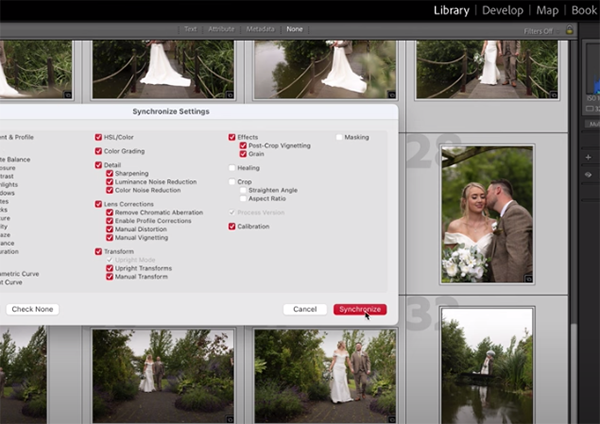
We’re always looking for methods that streamline the photo-editing process and get the job done faster without sacrificing image quality. The video below does that and more by explaining how you can automatically batch edit a selection of similar images using synchronization in Lightroom Classic.

This video is episode #89 in the popular 2-Minute Tutorial series by instructor James Feaver—a respected instructor committed to helping inexperienced photographers improve their shooting and post-processing skills.

If you’re a regular Shutterbug reader you know there are numerous ways to accelerate your workflow in Photoshop and Lightroom—some more complex than others. This lesson deserves a spot near the top of the list because it’s very effective and super simple to accomplish—wheather you’re an advanced Lightroom user or just getting started.

Feaver explains why this technique is so powerful, especially when you capture numerous images under similar lighting conditions, you want to create an effect that’s “custom made,” and copy and paste it over multiple photos.

He summarizes the process like this: “Instead of copying and pasting every one individually, we can auto batch edit a selection of images”—like the 30 shots he uses in this demonstration. And this technique provides far more control that simply using presets.

Feaver explains everything you need to understand, and then he walks you through the straightforward steps that are required to get the job done. Speed is the primary goal, but there’s another important benefit; namely, retaining a consistent look from one image in the sequence to the others.
After taking advantage of Feaver’s advice, be sure to pay a visit to his instructional YouTube channel where you’ll find more helpful techniques and previous episodes in this popular series.

We also recommend watching a tutorial we featured with another top pro who demonstrates how to add impact to autumn photographs in Lightroom by enhancing fall colors that paint the landscape with beautiful tones.
Share:
Reading time: 1 min
News and Tips

Don’t Sabotage Nature Photos with Incorrect Camera Settings (VIDEO)

November 6, 2024 by Louie Alma Photography No Comments

Don’t Sabotage Nature Photos with Incorrect Camera Settings (VIDEO)

This eye-opening tutorial begins with a provocative question: “Have you ever found yourself, camera in hand in hand, staring at some incredible lighting hitting a scene, only to waste so much time trying to configure your settings that you miss the light altogether?” Unfortunately this dilemma is rather common, but we’re going to make it a thing of the past in video below.

This tutorial comes to us from the Photography Explained YouTube channel, a great source for diagnosing a wide variety of problems that you may confront in the field. Today’s episode will help you capture these fleeting moments by dialing in a handful of key camera settings and changing or disabling a few others.

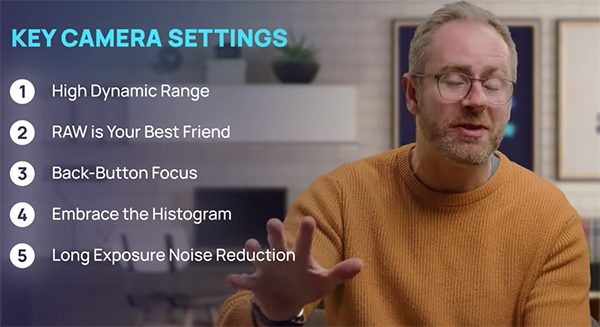
Our unnamed instructor puts it like this: “Mastering five essential camera settings can absolutely transform your landscape photos from meh to WOW.” And to add insult to injury, here’s the worst part: “If you’ve spent a load of money on camera gear and get these settings wrong, you might as well be shooting a flip phone from 2004.” Ouch!

So go grab your camera, click the Play button and let’s explore the five “most important” settings than may actually revolutionize every image you shoot in the great outdoors. This discussion includes High Dynamic Range (HDR), why Raw is your best friend, back-button focus, embracing the histogram, and long-exposure noise reduction.

Our instructor reveals the concept behind each of these important parameters, describes the options for each, and provides practical examples of when and how to put them to work, depending upon the specific task at hand. Follow his straightforward advice, and you may never miss a great photo opportunity again.

The point is this: “While your camera can do lots of awesome stuff on its own, it needs these settings dialed in to really make the shot work.” Be sure to watch until the end where you’ll learn a counterintuitive bonus tip that will “instantly improve the quality of your landscape images.”

One you’re done watching, pay a visit to the popular Photography Explained YouTube channel where you’ll find much more great shooting and post-processing advice.

We also recommend watching the earlier tutorial we featured with another accomplished camera expert who demonstrates a quick-and-easy test to determine the ISO limit of the sensor in every camera you own.

Share:
Reading time: 1 min
News and Tips

Use BLEND IF Sliders to Edit Photos That Say WOW! (VIDEO)

November 6, 2024 by Louie Alma Photography No Comments

Use BLEND IF Sliders to Edit Photos That Say WOW! (VIDEO)

Photoshop’s oft-ignored Blend If feature is a hidden gem that enables you to create professional-level edits that are guaranteed to wow your audience. This tutorial from the Adobe Live YouTube channel demystifies the process so that photographers of all skill levels can put it to use in minutes.

Instructor Jesus Ramirez is a post-processing expert and professional photo compositor. In this nine-minute episode he demonstrates how easy it is to blend layers based upon luminosity and color to achieve spectacular results. This video is #8 of an ongoing Photoshop series, and we encourage you to watch the earlier installments.

Ramirez promises that “in this video you’ll learn everything you to know about Photoshop’s Blend If sliders. Before diving in the topic the topic at hand, Ramirez quickly reviews the concept behind the RGB Color mode, “because understanding it will be essential for using Blend If effectively.”

In the RGB mode colors are made by combining red, green and blue. Ramirez explains that, “By mixing these primary colors at different brightness levels we can create millions of colors.” He notes that each RGB channel has 255 brightness levels ranging from 0 to the maximum with zero representing full black and 255 indicating maximum brightness.

The point is that Photoshop’s Blend If feature uses the same 0-255 scale to represent brightness, thereby allowing you to control which parts of a layer become transparent based upon brightness levels. Now that you’re armed with this knowledge, Ramirez pulls up a simple graphic to illustrate how Blend If works.

As you’ll see, there are two layers: a white-to-black circle over a gray background. To start, click on the empty space to the right of the gradient which opens the Layer Style window. Under Blending Options you’ll find the Blend If section at the bottom of the panel. There are three essential parts: The Blend if dropdown which sets the pixels you’re targeting, followed by two sliders—representing the Current layer and the Underlying Layer.

Ramirez then provides a step-by-step demonstration, with practical examples of putting all this to work to embellish just about every image you capture. One you get the hang of it, and this doesn’t take long, you’ll definitely want to add Blend If to your Photoshop workflow.

Be sure to visit the Adobe Live YouTube channel which contains numerous image-editing lessons like this one.

We also recommend checking out the earlier tutorial we featured with another post-processing expert who demonstrates a Photoshop secret for perfect exposure blending of bracketed photographs, with a free plugin that eliminates all the complexity.

Share:
Reading time: 2 min
News and Tips

Aerial Content: The Overlooked Tool for Builders and Developers

November 6, 2024 by Louie Alma Photography No Comments

Aerial Content: The Overlooked Tool for Builders and Developers


  • Home
    • About Us
    • Sharp Frame Media | Meet The Team
  • Residential
    • Pricing
      • Prices and Packages
    • Our Services
    • Matterport 3D Tours
    • Zillow 3D Home
    • Video
    • Additional Photo Services
    • Free Listing Website
    • Photo Gallery
  • Commercial
    • Our Services
    • Commercial Photography
    • Commercial Video
    • Short Term Rentals
    • Social Media Management
    • Photo Gallery
  • Blogs
  • Contact Us
Menu
  • Home
    • About Us
    • Sharp Frame Media | Meet The Team
  • Residential
    • Pricing
      • Prices and Packages
    • Our Services
    • Matterport 3D Tours
    • Zillow 3D Home
    • Video
    • Additional Photo Services
    • Free Listing Website
    • Photo Gallery
  • Commercial
    • Our Services
    • Commercial Photography
    • Commercial Video
    • Short Term Rentals
    • Social Media Management
    • Photo Gallery
  • Blogs
  • Contact Us


BOOK ONLINE

Aerial Content: The Overlooked Tool for Builders and Developers


  • November 5, 2024


  • ,
    12:55 pm

  • ,

    Uncategorized

In construction, capturing the full scope of a project from the ground level can sometimes fall short. Aerial content, which includes both high-definition drone photos and video footage, offers builders and developers a unique perspective, allowing for a more comprehensive view of construction progress and site details. This tool has proven invaluable for construction professionals in the Dallas-Fort Worth (DFW) area, who are constantly looking for ways to stand out in a competitive market.

Capturing the Construction Process with Drone Content

Aerial content provides the opportunity to capture the entire construction process from start to finish. Imagine a video that documents each phase—from site clearing to framing, and all the way to final completion. This type of footage can be edited into a powerful time-lapse video, showcasing the evolution of a project in a matter of minutes. This storytelling approach not only serves as a compelling marketing tool but also provides stakeholders and potential clients with a transparent view of how a project takes shape over time.

Enhancing Project Portfolios and Marketing Materials

In today’s visual-driven market, high-quality aerial content can elevate the appeal of any portfolio or presentation. Drone footage provides potential clients with a sense of scale and context, capturing elements such as the building’s surroundings, landscape integration, and architectural details that might otherwise go unnoticed. For DFW developers and commercial builders, showcasing properties from an aerial perspective allows for a comprehensive look at everything from accessibility to nearby amenities—key selling points for commercial properties.

Aerial visuals can also be repurposed across platforms. Drone content is highly versatile and performs well on social media, websites, and in email campaigns. Additionally, including aerial videos on listing services and MLS platforms increases the visibility and appeal of commercial properties, helping them stand out in a crowded real estate market.

Site Monitoring and Quality Control

Drone footage is not only useful for marketing but is also a valuable tool for operational purposes. Builders can use aerial content to monitor ongoing projects, inspect hard-to-reach areas, and oversee quality control. For large-scale developments in the DFW area, drones can provide a real-time, bird’s-eye view of progress, allowing project managers to assess site conditions and spot potential issues without stepping foot on the job site. This capability not only streamlines the inspection process but also enhances safety by minimizing the need for personnel to access risky areas.

Building Client Trust and Transparency

Investing in aerial content signals a commitment to transparency, professionalism, and innovation. When clients can see comprehensive, high-quality visuals of a project’s progression and completion, it builds trust and reinforces the builder’s or developer’s reputation. Particularly in the DFW construction industry, where competition is fierce, drone footage can differentiate one business from another by presenting a polished and thorough representation of work. These visuals become part of a lasting brand image, demonstrating that the builder prioritizes quality and detail.

Why Choose Sharp Frame Media for Aerial Content in DFW?

At Sharp Frame Media, we understand the unique needs of builders and developers in the Dallas-Fort Worth area. Our aerial services are tailored to capture every essential detail with precision, whether it’s for documentation, client presentations, or marketing. Our team specializes in creating drone footage that highlights the full scope and quality of your work, producing content that’s ready to enhance your portfolio, strengthen client relations, and boost your online visibility.

In the construction and development industries, where visuals play a crucial role in conveying project quality and scope, aerial content is an asset that cannot be overlooked. From documenting the build process to enhancing marketing materials, drone footage adds value to every stage of a project. By partnering with Sharp Frame Media, builders, and developers in the DFW area can take advantage of high-quality aerial content that resonates with clients and stands out in a competitive market. Let us help you elevate your projects—quite literally—and make a lasting impression.

If you’re ready to make an impact with aerial content, visit SharpFrameMedia.com or contact us today to discuss how our services can bring your vision to life.


Here are other related topics that might interest you:

How Outsourcing Social Media Management Can Save You Money
Branding Videos and Why You Need One
Hate Them or Love Them: Why You Still Need a Zillow 3D Tour

See more… 


Sharp Frame Media is a 5-star rated real estate media agency servicing Dallas-Fort Worth, and surrounding cities in Texas. Founded in 2015 on the values of craftsmanship, service, and partnership. As a veteran-owned company, our mission is driven by our commitment to unmatched service.

Want to Learn More About Sharp Frame Media? 

Services

Portfolio

Pricing

Review


Share this post


Schedule Now

Reach Us At

Sharp Frame Media

2831 Eldorado Parkway Ste. 103-141

Frisco, TX 75033

(214) 425-1651

M-F 8:00 am – 5:00 pm


Facebook-f


Instagram


Twitter


Vimeo

Important Links

  • Preparing Your Home
  • Pricing
  • Blog
  • Service Area
  • Satisfaction Guarantee Policy
  • Terms And Conditions
  • FAQ
  • Privacy Policy
Menu
  • Preparing Your Home
  • Pricing
  • Blog
  • Service Area
  • Satisfaction Guarantee Policy
  • Terms And Conditions
  • FAQ
  • Privacy Policy

About Us

We are a veteran-owned family business whose work has been published in major magazines. Now, we are expanding our services to meet the needs of real estate professionals like you. We value nothing more than making sure our clients are always 100% satisfied and will do whatever it takes to always make it right. 

© All rights reserved Copyrights 20020 by Twin Shoot LLC DBA Sharp Frame Media, 2017.

The post Aerial Content: The Overlooked Tool for Builders and Developers appeared first on Real Estate Photography in Dallas-Fort Worth.

Share:
Reading time: 5 min
Page 3 of 4«1234»

Advertisement

21 Magical Christmas Destinations in the Philippines for OFWs, Families, and Travelers

December 11, 2025

Hilton and Explora Journeys Announce Luxury Ocean Travel Partnership

Lidl is selling the cutest Cath Kidston pet beds for under £20 – they’re £30 cheaper than the Amazon version, so you’ll have to be quick

The Dyson PencilVac is here! I tried the ‘world’s slimmest vacuum’ before anyone else, and it’s ideal for grab-go-cleaning

Zoe Ball’s controversial take on hallway clutter has just made me re-evaluate my own relationship with tidying my home

Tom Kerridge has designed the perfect roasting tray for potatoes with M&S – its honeycomb surface helped me make my best ever roast dinner

Wrendale’s garden kneeler changed the way I garden – it’s so comfortable, it’s beautifully designed, and it’s lasted me years

Star Alliance Named World’s Leading Airline Alliance Once Again

December 10, 2025

Etihad Guest Rewards 10 Extraordinary Challenge Winners at the Formula 1 Etihad Airways Grand Prix

The Tower of London River Tour – the UK’s First Electric Tour Boat Is a Story of Tourism

Subscribe to Our Newsletter

Check your inbox or spam folder now to confirm your subscription.

Popular Posts

LUXURY APARTMENT IN DUBAI

LUXURY APARTMENT IN DUBAI

August 20, 2020
LUXURIOUS AND SPACIOUS VILLA IN DUBAI

LUXURIOUS AND SPACIOUS VILLA IN DUBAI

LUXURY VILLA IN PALM, DUBAI

LUXURY VILLA IN PALM, DUBAI

August 26, 2020

Advertisement

Pages

  • 360 Interactive Virtual Tour Sample
  • About the Photographer
  • Business Portrait Photography
  • Concert Photography
  • Event Photography
  • Fashion Photography
  • Food Photography
  • Landscape Photography
  • Portrait Photography
  • Product Photography
  • Real Estate Photography
  • Sport Photography
  • Still Photography
  • Street Photography
  • Travel Photography
  • Videography

Categories

  • Apartments
  • Food Photography
  • Latest Projects
  • Luxury Residences
  • News and Tips
  • Real Estate Photography
  • Villas

Before and After Version

  • STYLISH APARTMENT IN CITYWALK, DUBAI

  • ULTRA LUXURIOUS RESIDENCE IN DUBAI

  • Real Estate Photography in Dubai, UAE

    Luxurious 7 Bed Villa with Private Pool, Cinema, Bar and Lounges at Jumeirah Golf Estates

  • LUXURY VILLA IN PALM, DUBAI

© 2020 Copyright Louie Alma Photography. All rights reserved.



