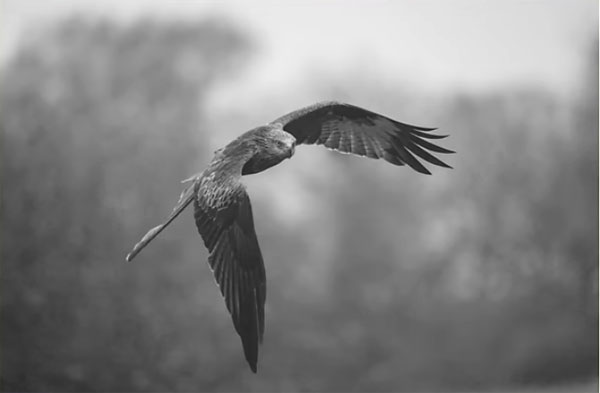
Congratulations to Katherine Plessner for winning the recent Motivational Moments Assignment with the image, “A Photographer’s Dream Location.” See more of Plessner’s photography on Flickr.
View the winning image and a selection of submissions below. And be sure to check out our current photography assignment here and enter your best shots!
Wildlife and nature photography is often quite a challenge, with uncertain weather, ever-changing light, and subjects that quickly move through the frame. The video below promises to, “make your life as a photographer just a little bit easier” with five very effective hacks for beginners and experienced shooters alike.
This episode comea from Walks on the Wild Side, an instructional YouTube channel devoted to helping outdoor photographers improve their results in the field. Like other hacks we’ve posted in the past, these can really make an impact, and we’re pretty sure there are at least three or four in this lesson that you haven’t heard before.
Instructor Scott Walker in a British pro who regularly posts tutorials on all aspects of shooting nature, from wildlife and macro photography to landscape imagery and more. The simple tricks he provides here are targeted at capturing wildlife, but they’re equally appropriate for much of what you photograph outdoors.
Walker’s first hack is about a odd piece of “gear,” and it’s definitely something that’s never found it’s way into our kit: He suggests carrying a small bag of flour whenever you go out to photograph birds! As some of you know, most birds take off into the wind, but sometimes a breeze is so subtle that its direction is difficult to discern. In those situations Walker sprinkles a bit of flour in the air and the wind direction immediately becomes apparent.
When out photographing birds Walker also carries a small clamp that he uses to create a natural looking perch by attaching a small branch to the top of an unused tripod in a spot that offers good light and a pleasing background. It’s sort of surprising how often his feathered subjects comply.
Most photographers know that background blur can really make a subject stand out, and this effect is pretty easy to accomplish in the camera. But Walker has an interesting hack for creating foreground blur—simply by strategically holding a small object between the camera and his subject.
You’ll have to watch the video to see Walker demonstrate his other two intriguing hacks. Let’s just say that they’re as unique and effective as those mentioned above.
After viewing this interesting video, we suggest that you pay a visit to Walker’s YouTube channel where there’s much more to learn.
Luminar Neo is becoming increasingly popular among photographers these days—either as an alternative to Photoshop and Lightroom, or to add one more option to their image-editing toolkit. Today we’re going to give you a quick rundown of what’s new in the latest version 1.8.0.
Neo has a lot of appeal for several reasons. It’s affordable compared to other software options, offers a broad array of tools, and has a straightforward interface that makes it very easy to use. And like other products from Skylum software, Neo delivers impressive results.
We often turn to imaging-editing expert Anthony Morganti for helpful tutorials on making the most of whatever software you have. He also has a knack for breaking down the key features of new updates, and that’s exactly what he does with Luminar Neo 1.8.0 in the episode below.
According to Morganti, “there isn’t anything earth shattering in this update.” There are, however, a few important tweaks that make using Neo faster and more effective than ever before—and they take barely four minutes to explain.
The first enhancement has to do with the Histogram located in Neo’s Edit panel. As you’ll see, this helpful tool sometimes fails to appear at the top right of your screen. Morganti explains how to check a box so the Histogram will be where it belongs from now on.
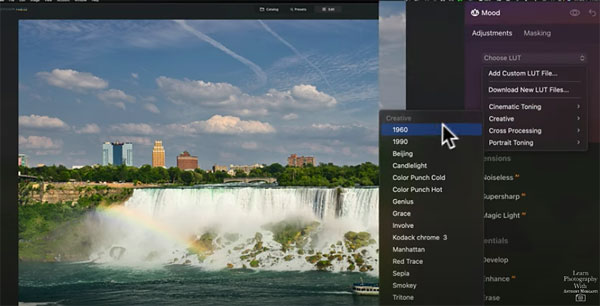
Skylum calls their next set of tweaks “Preview on Hover,” and this can be used with more than one tool. Morganti illustrates this feature by choosing the Develop Raw tool, where the panel displays a selection of camera profiles. In the past you had to click on one of the options to see how it’s affects an image.
But now you can immediately view the impact on your photo by hovering over each of the profiles. This new capability is a real timesaver because it enables you to instantly compare the various profiles without opening one after another. Morganti demonstrates how to use “Preview on Hover” with other tools too.
So what else is new in Luminar 18.0.1? Watch the rest of the video to find out. Morganti walks you through a simple step-by-step process for each of the enhancements.
If you show anyone pictures of birds from South America, there are two types that they are sure to know: toucans and parrots! Toucans are the subject of today’s article – I’ve photographed them for years during my travels, with a variety of camera equipment. Yet almost always with a 400mm lens.